
Site hosted by Angelfire.com: Build your free website today!

Internal Hardware

Gudelines

Case

Preparing Components

Fitting the MotherBoard

Installing the CPU

Mounting the Cooler

Installing the RAM

Graphics, Sound and Network

Installing the Hard Disk

Connecting

PowerConnectors and Final Check

To External Hardware

Preparing To Fit The Components

Preparing To Fit The Components
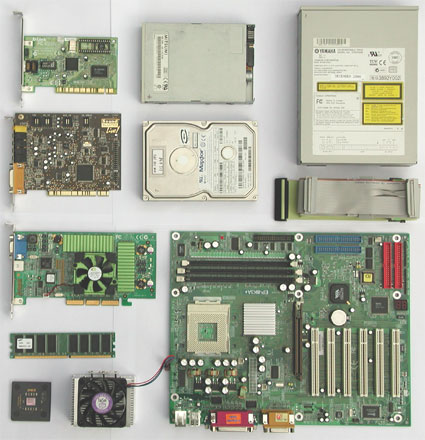
Overview of all components (from left to right and top to bottom): network adapter card; floppy disk drive; CD-ROM drive; sound card; hard disk; ribbon cable; graphics card; RAM; CPU cooler; and, motherboard.

Let's take another look at the photo. The inclusion of a component from a particular manufacturer does not imply a recommendation on our part. We use them to illustrate the installation procedure of similar components. The choice of components is entirely up to you. You can always find reviews of the latest products on the Tom's Hardware site, together with articles on the latest developments and product recommendations.