|
Updated 2003/05/10
Get
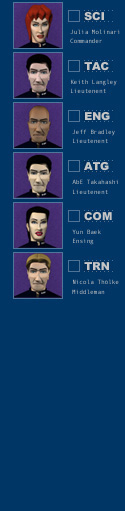
to know your crew
Select one of your
crew and the correponding ship station to know more:
SCIENCE:
Commander
Julia Molinari
TACTICAL:
Lieutenent
Keith Langley
ENGINEERING:
Lieutenent
Jeff Bradley
HELM:
Lieutenent
Abe Takahashi
COMMUNICATIONS:
Ensign Yun
Baek
TRANSPORT:
Middleman
Nicola Thölke
More questions? Click
here to send us an e-mail or
report bugs.
|
Stats/Bio
Name: Molinari, Julia
Height: 170 cm
Weight: 64 kg
Rank: Commander
Assignment: Science
Officer
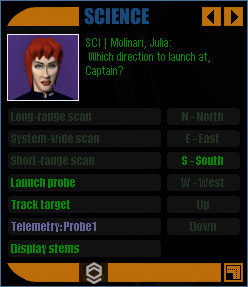
This is the captain's
interface with Commander Julia Molinari, the
ship's science officer.
LONG-RANGE
SCAN: Cmdr. Molinari will configure the sensors to detect deep-space
activity.
SYSTEM-WIDE
SCAN: Cmdr. Molinari will configure the sensors to scan objects
within 250 A.U.
SHORT-RANGE
SCAN: ask Cmdr. Molinari to scan the proximities of your vessel
for objects within tactical range.
LAUNCH
PROBE: issue the order to launch a torpedo modified for deep-space
scanning.
TRACK
TARGET: Ms. Molinari will attempt to keep a radar lock on the select
vessel at all times.
ROTATE
PROBES: gather the current data sent by each probe individually.
CENTER
ON SHIP: switches
the center view between ownship or targets.
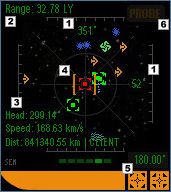
 SCANNER AIM INDICATORS:
The numbers show where the narrow-band scanner is pointing at in sector
coordinates.
 RANGE INDICATOR:
Displays the max distance covered by the scans.
 OBJECT DATA:
Shows the current target's absolute heading and speed, and the relative
distance from your vessel or from the current active probe.
 OBJECT LOCK-ON RETICULE:
Shows a positive lock on that object. The targeting system will lock on
the closest object if two or more object are aligned with the view. Zoom
in with the FOV adjusters to get a clear view of the desired target.
 FIELD-OF-VIEW ADJUSTERS:
Click on to increase or decrease the field of view of the camera (zoom
in or out of the view).
 PROBE SELECTOR:
Click on to cycle through the views of the active probes, and between
the probes and your ship's scanner.
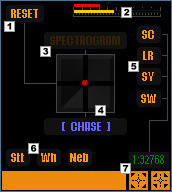
RESET SCANNING SYSTEM:
Click on to reset the pitch, yaw, field-of-view of the targeting camera,
and to turn off the "chase target" mode.
EXTERNAL RADIATION GAUGE:
Shows the amount of external radiation that is reaching the ship in comparison
with the own ship's shields recharge rate. If the select object is another
ship, that ship's current weapons and shields recharge rate is shown (its
radar signature).
SPECTROGRAM TOGGLE BUTTON:
Activate this function to display the stars in the scanner's view with
their respective class coloration. Yellowish and redish stars have more
chance of bearing life-supporting planets in their vicinities.
VIRTUAL JOYSTICK:
Click on and drag with your mouse to change the scanner's
aim. Deactivate the chase button to make the scanner stop following the
current target.
SC / LR / SY / SW BUTTONS:
Set the scanner's yon parameter to the pre-set sector-wide, long-range,
planetary system-wide, or tactical magnifications.
SHOW / HIDE OBJECT TOGGLE BUTTON:
Click on to show or hide a certain type of object (stations, wormholes,
nebulae).
 SCANNER YON ADJUSTER:
Shows the current
factor for the scanner's filter-out function. The 1:1 factor means that
objects father than 63 AU are not shown in the scanner's view. Click on
to increase or decrease the scanner's yon distance.
|