
6) tab na`y cho mi`nh cho.n output folder, input file type va` output file type, va` delete files.
6a) trong tru*o*`ng ho*.p ma` CT dda? no'i trong part 1, Ct muo^'n convert karaoke tu*` dvd ra svcd do ddo' trong "input file type" CT cho.n DVD va` "Output file type" CT cho.n MPEG2. CT ddo^`ng tho*`i check "Don't delete any files" . Ca'i na`y quan tro.ng ta.i vi` trong lu'c convert, ne^'u ma'y mi`nh bi. ddu*'ng hay bi. tru.c tra(.c gi` thi` mi`nh co' the^? "recover" va` start from the last step before the problem instead of starting all over again. Nhu*ng ma` ca'ch na`y ddo`i ho?i fa?i co' nhie^`u hdd space
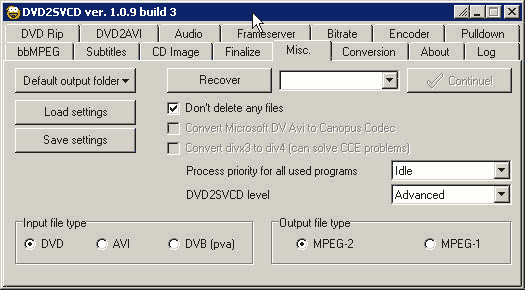
6b) Click on the "default output folder" va` cho.n folder trong partition na`o ma` co`n nhie^`u free disk space

6c) trong "process priority" CT cho.n "idle" va` "DVD2SVCD level" cho.n "Advanced"
Conversion Tab || Misc Tab || DVD Tabs || Audio Tab || Frame Server Tab || Bitrate Tab || Encoder Tab || CD Image Tab || Entrypoint and Chapters
