
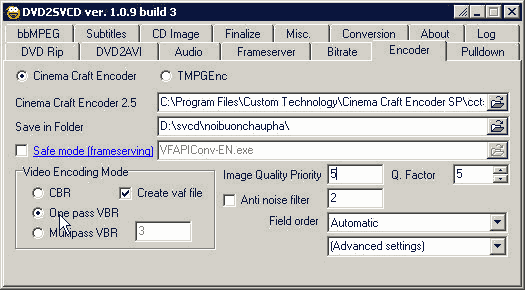
12) This step is very important because it will dictate how good your encoded picture will be. Rule of thumb is that the more passes you do, the better the picture quality, the longer the time to take to encode. People have done many tests on the number of passes to optimize picture quality and the time it takes to encode. They said between 3 and 4 passes will give excellent picture. Anything beyond 4 passes, you are wasting your time but don't gain anything in picture quality.
12a) if you decide to use 3 pass vbr, set the "image quality priority" to 24. If the source is dirty, you can turn on "anti noise filter". Most of the time, you don't need to turn this on. use "automatic" for "field order" va` "advanced settings". With mutipass, be prepare to wait and wait and wait. But there is a way to shorten the encoding time w/o sacrifice picture quality.

12b) One pass VBR will shorten the encoding time significantly w/o sacrificing picture quality. CT only use this when the video bitrate is > 2000 kb/s in the Bitrate tab. If decided to use one pass vbr, then set the "image Quality priority" to 5, set "Q factor" to 5 and again you can turn on "antinoise filter" if the original source is not too clean.
Conversion Tab || Misc Tab || DVD Tabs || Audio Tab || Frame Server Tab || Bitrate Tab || Encoder Tab || CD Image Tab || Entrypoint and Chapters
