
7) Ba^y gio*` no'i ve^` DVD
Rip tab, trong tab na`y thi` simple thui. Make sure to check "Activate
DVD Ripping" (ne^'u la`m tha(?ng tu*` DVD, ne^'u dda? co' sa(?n vob file
on hdd, thi` uncheck this. We will talk about this later). Cho.n "use internal
routines"

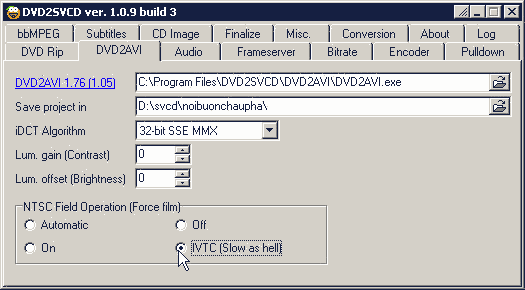
8) Trong DVD2AVI tab, trong pha^`n tre^n mi`nh dde^? nguye^n. ne^'u ma`n hi`nh trong original dvd ho*i to^'i thi` mi`nh co' the^? chi?nh le^n "lum gain (contrast)" va` "lum offset (brightness". CT thu*o*`ng thu*o*`ng dde^? zero.
8a)Trong pha^`n du*o*'i, "NTSC Field Operation (Force film)", Ct fa?i explain 1 chu't. Ne^'u la`m film My~, pha^`n ddo^ng mi`nh cho.n "automatic". Trong automatic mode no' co' the^? tu*. ddo^.ng detect film dvd na`y co' video type gi`. Ne^'u video type la` "film" thi` no' se? la`m pulldown, co`n ne^'u la` NTSC thi` no' se? la`m IVTC (but not always correct). Ne^'u la`m film ta`u, VN or karaoke VN thi` almost 100% fa?i ca^`n IVTC. Do ddo' CT cho.n "IVTC (slow as hell)"
Conversion Tab || Misc Tab || DVD Tabs || Audio Tab || Frame Server Tab || Bitrate Tab || Encoder Tab || CD Image Tab || Entrypoint and Chapters
