
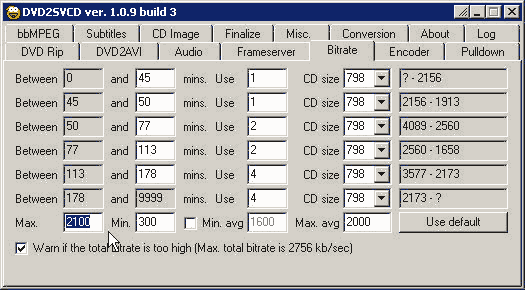
11) How to calculate bitrate. In step 5C, we want to convert 8 selected songs totaled 32.34 min and we want to put this 8 songs in one CD. So how do we set this in the bitrate tab. On line 1, type in 33 min. see picture

11a) line 1 tell us that a 33 min movie clip using one 798 mb cd can have the video bitrate up to 3040 kb/s. but the max bitrate for video + audio is 2756 kb/s, therefore, we can set the video bitrate max at 2530.
11b) However if you want to convert a 45 min movie clip onto one 798 mb cd, then the video bitrate now is reduced to 2156kb/s. Now we have to set the max video bitrate to 2100 kb/s and Max avg to 1950 - 2000
Conversion Tab || Misc Tab || DVD Tabs || Audio Tab || Frame Server Tab || Bitrate Tab || Encoder Tab || CD Image Tab || Entrypoint and Chapters
