
|
NP Computer Hardware page Understanding Hard
Disks Source : PowerQuest Corporation |
When you boot an OS, that OS assigns drive letters (e.g.,
C:, D:, etc.) to the primary and
logical partitions on each hard disk. These drive letters
are used by you, your system, and
all your applications to reference files on the partition.
Your OS may change the drive letter assignments if you add
or remove a second hard disk.
Drive letter assignments may also be altered if you add,
remove, or copy a disk partition;
reformat a partition with a different file system; or boot
a different OS. These kinds of
drive letter changes can sometimes invalidate parts of
your system configuration. For
example, applications that are programmed to look for
startup files on a specific drive may
no longer launch.
To avoid configuration changes and/or fix configuration
problems, you need to understand
the following:
• How the OS assigns drive letters;
• Problems caused by drive letter changes;
• What you can do when partitioning to avoid drive letter
changes;
• How to fix configuration problems caused by
unavoidable changes.
How
the OS Assigns Drive Letters
DOS,
Windows 3.x, Windows 95/98/Me, and OS/2
These OSs assign drive letters in a fixed sequence which
cannot be changed. This
sequence is as follows:
• The OS begins by assigning a drive letter to the
first primary partition that it
recognizes on the first system hard disk. The OS then
assigns drive letters to the first
primary partition recognized on each successive hard disk.
For example, imagine you
have three hard disks in your system. When you boot your
OS, it assigns drive letter
C: to the active primary partition on the first hard disk.
Drive letter D: is assigned to
the first primary partition that the OS recognizes on the
second hard disk, and drive
letter E: is likewise assigned to the first primary
partition on the third disk.
If you have multiple visible primary partitions on a
single hard disk, the OS assigns
the drive letter to the active partition. If none of the
partitions are active, the drive
letter is assigned to the first visible primary partition
recognized by the OS.
WARNING!
Making multiple primary partitions visible on the same
drive can cause
data loss in DOS, Windows 3.x, Windows 95/98/Me and OS/2.
• Next, all logical partitions recognized by the OS
are assigned drive letters, starting
with the logical partitions on the first hard disk and
proceeding in order. For example,
suppose you have two hard disks in your system, each with
one primary and two
logical partitions. The OS first assigns C: and D: to the
two primary partitions, then
assigns drive letters E: and F: to the first and second
logical partitions on the first hard
disk. Drive letters G: and H: are assigned to the two
logical partitions on the second
disk.
• The OS then assigns drive letters to any remaining
visible primary partitions, starting
with those on the first hard disk. The OS proceeds to any
visible primary partitions on
the second disk, then the third disk, and so on.
• Finally, CD-ROM drives and other types of removable
media are assigned a drive
letter.
Because the OS always follows this sequence to assign
drive letters, adding or removing a
second hard disk can cause changes to your drive letter
assignments. Likewise, drive
letters can change if you add, remove, or copy a disk
partition; reformat a partition with a
different file system; or boot a different OS.
When Windows NT/2000/Xp is first installed, it assigns
drive letters in the same manner as
described above. Once assigned, however, these drive
letters do not change, regardless of
changes to the hard disks or partitions in your system.
The drive letters are “sticky,” so to
speak, and remain permanently assigned to the same
partitions.
To illustrate how drive letters are assigned, consider the
following examples.
A computer has one hard disk, on which Windows 95 is
installed. The partitioned disk is
shown below (Figure 6).

Computer with a single hard disk
containing one primary and two logical partitions
The disk is partitioned into a primary partition and an
extended partition that contains two
logical partitions. The primary partition is formatted
with the FAT file system and has
Windows 95 installed. The first logical partition is
formatted with the FAT file system,
which Windows 95 recognizes, but the second logical
partition is formatted with NTFS, a
file system that Windows 95 does not recognize.
On this disk, Windows 95 would assign the drive letter C:
to the primary partition and the
drive letter D: to the first logical partition. It would
not assign a drive letter to the second
logical partition because it does not recognize the file
system on that drive.
Now consider a computer identical to the first example
except that a second hard disk has
been installed.
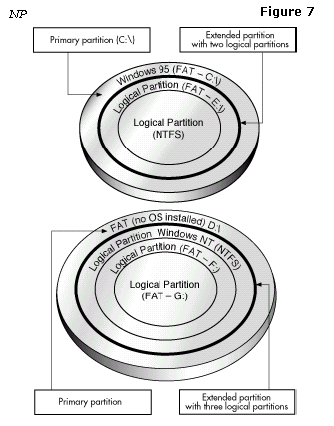
Computer with
two hard disks, booted from Windows 95
The first hard disk is partitioned in exactly the same way
as in the first example. It has the
same file systems on the partitions, and Windows 95 is
installed on the single primary
partition.
The second disk also has one primary partition and an
extended partition; however, its
extended partition contains three logical partitions.
There is no OS installed on the
primary FAT partition of the second hard disk. The first
logical partition is an NTFS
partition with Windows NT installed. The two remaining
logical partitions are FAT
partitions.
