
|
NP Computer Hardware page Understanding Hard
Disks Source : PowerQuest Corporation |
What Is a Hard Disk?
A hard disk or drive is the part of your computer
responsible for long-term storage of
information. Unlike volatile memory (often referred to as
RAM) which loses its stored
information once its power supply is shut off, a hard disk
stores information permanently,
allowing you to save programs, files, and other data. Hard
disks also have much greater
storage capacities than RAM.
A hard disk is comprised of four basic parts: platters, a
spindle, read/write heads, and
integrated electronics.
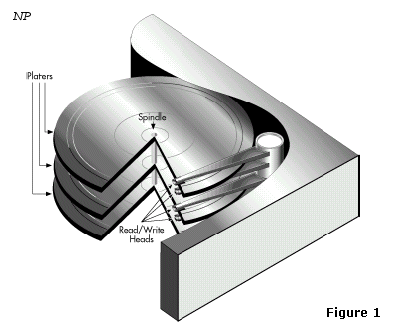
Basic
components of a hard disk
• Platters are rigid disks made of metal or
plastic. Both sides of each platter are
covered with a thin layer of iron oxide or other
magnetizable material.
• The platters are mounted on a central axle or spindle,
which rotates all the platters at
the same speed.
• Read/write heads are mounted on arms that
extend over both top and bottom
surfaces of each disk. There is at least one read/write
head for each side of each
platter. The arms jointly move back and forth between the
platters’ centers and
outside edges; this movement, along with the platters’
rotation, allow the read/write
heads to access all areas of the platters.
• The integrated electronics translate
commands from the computer and move the
read/write heads to specific areas of the platters, thus reading
and/or writing the
needed data.
Computers record data on hard disks as a series of binary
bits. Each bit is stored as a
magnetic charge (positive or negative) on the oxide
coating of a disk platter.
When a computer saves data, it sends the data to the hard
disk as a series of bits. As the
disk receives the bits, it uses the read/write heads to
magnetically record or “write” the
bits on the platters. Data bits are not necessarily stored
in succession; for example, the
data in one file may be written to several different areas
on different platters.
When the computer requests data stored on the disk, the
platters rotate and the read/write
heads move back and forth to the specified data areas. The
read/write heads read the data
by determining the magnetic field of each bit, positive or
negative, and then relay that
information back to the computer.
The read/write heads can access any area of the platters
at any time, allowing data to be
accessed randomly (rather than sequentially, as with a
magnetic tape). Because hard disks
are capable of random access, they can typically access
any data within a few thousandths
of a second.
What Is Disk Formatting?
Computers must be able to access needed information on command;
however, even the
smallest hard disk can store millions and millions of
bits. How does the computer know
where to look for the information it needs? To solve this problem, hard
disks are
organized into discrete, identifiable divisions, thus
allowing the computer to easily find
any particular sequence of bits.
The most basic form of disk organization is called
formatting. Formatting prepares the
hard disk so that files can be written to the platters and
then quickly retrieved when
needed. Hard disks must be formatted in two ways:
physically and logically.
A hard disk must be physically formatted before it can be
logically formatted. A hard
disk’s physical formatting (also called low-level
formatting) is usually performed by the
manufacturer.
Physical formatting divides the hard disk’s platters into
their basic physical elements:
tracks, sectors, and cylinders. See Figure 2. These
elements define the way in which data
is physically recorded on and read from the disk.
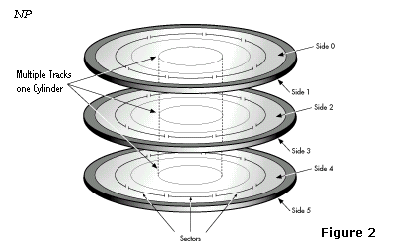
Physical format of a typical hard
disk
• Tracks are concentric circular paths
written on each side of a platter, like those on a
record or compact disc. The tracks are identified by
number, starting with track zero
at the outer edge.
• Tracks are divided into smaller areas or sectors,
which are used to store a fixed
amount of data. Sectors are usually formatted to contain
512 bytes of data (there are 8
bits in a byte).
• A cylinder is comprised of a set of tracks
that lie at the same distance from the
spindle on all sides of all the platters. For example,
track three on every side of every
platter is located at the same distance from the spindle.
If you imagine these tracks
vertically connected, the set forms the shape of a
cylinder.
Computer hardware and software frequently work using
cylinders. When data is
written to a disk in cylinders, it can be fully accessed
without having to move the
read/write heads. Because head movement is slow compared
to disk rotation and
switching between heads, cylinders greatly reduce data
access time.
After a hard disk is physically formatted, the magnetic
properties of the platter coating
may gradually deteriorate. Consequently, it becomes more
and more difficult for the
read/write heads to read data from or write data to the
affected platter sectors. The sectors
that can no longer be used to hold data are called bad
sectors. Fortunately, the quality of
modern disks is such that bad sectors are rare.
Furthermore, most modern computers can
determine when a sector is bad; if this happens, the
computer simply marks the sector as
bad (so it will never be used) and then uses an alternate
sector.
Logical
Formatting
After a hard disk has been physically formatted, it must
also be logically formatted.
Logical formatting places a file system on the disk,
allowing an operating system (such as
DOS, OS/2, Windows, or Linux) to use the available disk
space to store and retrieve files.
Different OSs (operating systems) use different file
systems, so the type of logical
formatting you apply depends on the OS you plan to
install.
For more in-depth information on file systems, see “File
Systems”.
Formatting your entire hard disk with one file system necessarily
limits the number and
types of OSs you can install on the disk. Luckily, there
is a solution to this problem.
Before a disk is logically formatted, it can be divided
into partitions. Each partition can
then be formatted with a different file system, allowing
you to install multiple OSs.
Dividing your hard disk into partitions also allows you to
use disk space more efficiently.
For more information on partitions, see “Understanding Partitions”.
