Text Warping
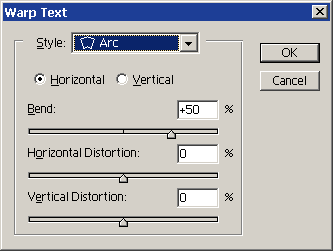
 The Warp Text Dialog box allows you to bend and distort
type in a variety of ways. The style menu allows you to choose from 15
different warp styles. Warp effects can be applied to the entire type
layer whether it is line text or paragraph text. On paragraph text the
warp is applied to the bounding box. Once you choose a warp style, you
can adjust the effects using the other options in the dialog box. The Warp Text Dialog box allows you to bend and distort
type in a variety of ways. The style menu allows you to choose from 15
different warp styles. Warp effects can be applied to the entire type
layer whether it is line text or paragraph text. On paragraph text the
warp is applied to the bounding box. Once you choose a warp style, you
can adjust the effects using the other options in the dialog box.
- The horizontal and vertical radio buttons control the orientation
of the warp.
- Bend controls the amount and direction of the warp. For instance,
an arc effect will become more pronounced the closer you move the
slider to the end of the scale. The left half of the scale creates
a downward arc. The right side of the scale creates an upward arc.
- The Horizontal and Vertical distortion sliders allow you to apply
perspective to the warp effect.
|
all information and images on this page are taken from Sue Chastain's Graphics Software site at About. com.
Here's the link to the original: GraphicsSoft
|