 -Thugie -InKane -Chaotic Kid -Shaggy 2 Dope -Short Stuff -Pain |
 -Starter -Positioning -Move -Screen shake -Overlapping |
 -Arenas -Props -Links -Banners -Contact |
 -PSP -Photoshop 4 -Gif Movie Gear -SFPWXP |
SFPWXP Screen Shake tutorial:
This tutorial was written by Short Stuff and can't be used by anyone else unless they credit me.
1: When it comes to the frame you want the screen to shake in paster the sprite in as normal.
2: Link the bg and sprites.
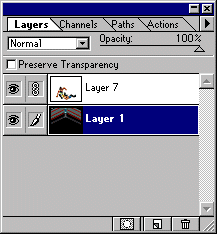
3: Using the down arrow key move down 4-5 times.
4: Copy the frame into GMG.
5: Now hit the up arrow key the same ammount you hit down plus 2 more.
6: Add the next snapshot in.
7: Copy the frame into GMG.
8: Now hit the down arrow key 2 times.
9: Add the next snapshot.
10: You've made a screen shake.
