

The Pencil tool is used in much the same way that you
would use a real pencil to draw. Simply select the tool and drag on the Stage
to draw with the Pencil tool.
You can press the Shift key while dragging to constrain
lines to vertical or horizontal directions.
You can specify the color with the Stroke Color
Tool.
Color Tools:

You can apply smoothing or straightening to the lines
by setting a Pencil mode.
Pencil Modes:

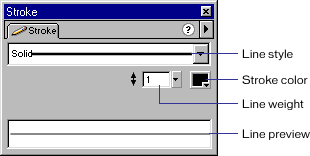
Finally, you can specify line style (solid, dotted
etc.), line width in pixels and color using the Stroke panel.
Stroke Panel:
toolbox | pencil tool | brush tool | oval tool | rectangle tool | line tool | eraser | eye dropper| ink bottle | pen tool | Flash menu | main menu | schoolnotes
