
Notice in the top right hand corner of your Word screen there are two X's.A white X on a red button and a black X underneath.
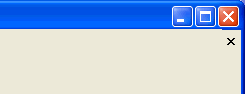
The black X will only close the document that you are currently working on. The white X on the red button will close the program, Microsoft Word. While you are working it is possible to have more than one WOrd doument open at once. By using the black X you can close documents one at a time without closing the program.
[Back] [Next]
