Site hosted by Angelfire.com: Build your free website today!

Home

Syllabus

Step by Step Procedures

Articles

Examples & Samples


Step 4: Naming and Titling Your Pages

Naming your pages and titling your pages are not the same action. Even though this seems complicated at first, it's really not. And it is a concept that must be understood in order to work with ease on your site.

Each web page that you create is a separate file[1]. Each file will have an extension[2][Those letters at the end like .htm or .html]. We keep these files in folders. The names of files are what you see when you look through your computer folders or when you look through your web directory[3]. Naming a web page is not the same as titling a web page.

The title of a page is what will show up in the title bar (that top bar that has words in it) of your web page when viewed through a browser like Netscape or Internet Explorer. Also, it is what will be heard when your site is explored by someone who is visually impaired and has a voice program on their computer. Because of their different purposes, pages are named and titled differently.

Some web programs will only accept files if they are named a certain way. Here are some guidelines for naming your files:

bullet

Use all lowercase letters.

bullet

Use only letters. No symbols or punctuation marks except hyphens or underline marks.

bullet

Do not put any spaces between words.

bullet

Try to keep your names short. No longer than eight characters without the extension.

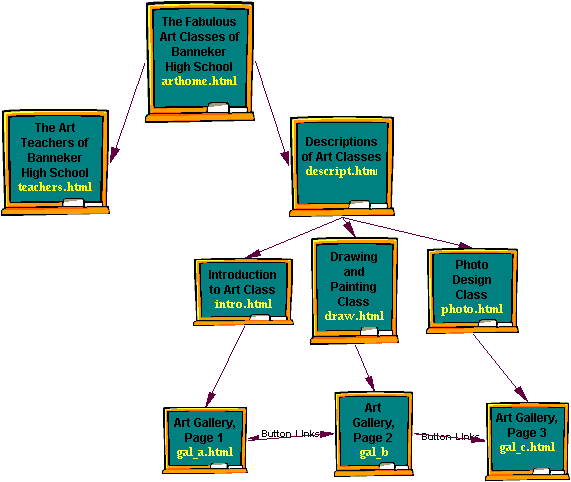
When titling your pages you can say more specifically what that page is about. For example, a page that is named draw.htm may be titled Our Drawing and Painting Students. When you title a page you can use capitals, spaces and make them long. Titles should be descriptive.

Here is an example of the titles and names of an art site:

[1] File: a file may be a word processing document, a scanned slide or photo, a newsletter on your computer, a web page, etc. Each of these is considered to be a separate file. Files may be kept in folders.

[2] Extension: Extensions are those letters that you see after the dot at the end of a file name. A document may have .doc as and extension; A web page may have .htm or .html.

[3] Directory: A directory is just another name for folder on your web site. PC users tend to call them directories and Mac users call them folders.

Activity:

On the back of the sticky notes that you used to organize your web in the previous activity, write a name and title for each page. If you start off with a system for naming and titling your work, you will save time later.

3previous page
Step 3: Organizing Your Site

next page 4
Step 5: Creating Your Pages

 
© Kerry Marquis 2002
Comments and questions may be directed to Kerry Marquis
Page last modified: Monday, 21 March 2005