|
Decision Tables
Decision Tree
Flow Charts
| |
Software
development life cycle
After completing this
short lesson you should be able to:
- sketch and briefly explain the software
development life cycle (SDLC)
- describe where in the SDLC the program
design activity fits
- explain what is meant by the terms
variable and process
Although the lesson isn't specifically about designing programs
it does help to put program design into some perspective.
Software Development Life Cycle
A program may result from some problem, in this case problem means
some task requiring a solution, or from a bright idea, or because it
is a project which has been set for student. No matter what their
first causes computer programs, aka software, and software systems,
collections of softwares, have quite well-defined life cycles. The
need for a program is recognised, the requirements are analysed, a
possible solution is designed, the prototype is built and tested,
and finally the program is put into use. Figure 1 shows the
typical life-cycle for a computer program.
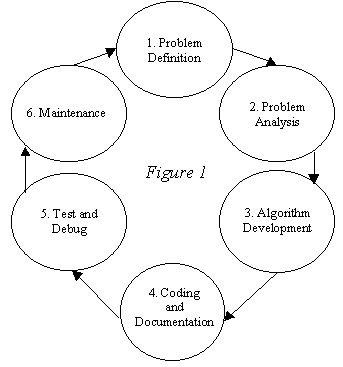
During phase one the emphasis is on fact-gathering and determining
where the boundaries of the problem are.
Phase two involves the steps of identifying the variables and
processes which make up the problem.
Phase 3 is where you will use the tools and techniques that you
learn in this module. During this phase the strategies which will
solve the problem are developed.
Phase 4 represents the time when the solution to the problem, the
programs or system, is constructed.
Phase 5 is a critical time but can be minimised if the previous
steps are correct.
Phase 6, the maintenance phase, is the time when the solution is in
active use. It may undergo enhancements or it may have bugs fixed
during its lifetime.
There is a strong connection between phases 2 and 3 since the
process of designing a solution to a problem is an iterative process
and often involves a great deal of discovery. For example as you
refine an algorithm you might discover that there are variables
and/or processes that weren't obvious during phase 2. This is to be
expected, after all you are just learning about this kind of thing,
but you can expect to meet this kind of discovery right throughout
your life as a program designer.
Variables and Processes
The terms variables and processes have been mentioned a couple of
times and were also featured in a previous lesson. In won't hurt to
review what these terms mean.
A variable is something whose value will change over time.
For example daily temperature is a variable. If you measure the room
temperature now and measure it one hour from now there is every
chance that the two measurements will give different values. In this
example the word temperature represents a variable. A process
is an activity which, in computing terms, transforms data. In
general terms a process is an activity which involves some steps
designed to achieve a particular outcome. Processes take data, the
contents or values of variables, and transform it.

It is useful to show processes and the data they act on in a simple
diagram form as shown here in Figure 2. This figure is very
similar to the Data Source - Program - Data Sink figure you saw in
the introduction. It shows that processes have inputs, transform
data and generate outputs. An example might be a payroll calculation
process which has inputs called Hours_Worked and Pay_Rate and which
produces an output called Gross_Pay. In this example Hours_Worked,
Pay_Rate and Gross_Pay are all variables.
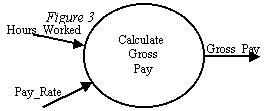
Figure 3 shows a more usual way of representing processes and
variables and is used here just to emphasise the nature of processes
and variables. Note that variable names like Hours_Worked, Pay_Rate
and Gross_Pay are often written with underscores. This is to help
clearly identify the variables by giving them names and because most
computer languages don't recognise variable names which contain
spaces.
There is no substantial difference between computer processes as
they are described here and computer programs. In Figure 3 the
Calculate_Gross_Pay process could be a complete computer program or
it could be a process within a program. This is an important point
to keep tucked away at the back of your mind as you develop your
skills and knowledge in 3GL Program Design.
Summary
You should have some idea now about the place of program design in
the overall life cycle of software systems.
|
|
|
| |
Notice: These notes are intended to be a supplement, not a substitute, to
attending class.
|