|
| |
Designing programs
with flow charts
After completing this lesson you
should be able to:
- describe what is meant by a program flow
chart
- sketch the symbols and constructs used
in flow charts
- state the guidelines for drawing flow
charts
- design programs using flow charts
- use subprocesses in flow charts
- use nested loops in flow charts
- use multiway selection in flow charts
There are some exercises for you to do and each exercise has a
sample answer:
Exercise 1 - a first flow chart
Exercise 2 - a flow chart with subprocesses
Exercise 3 - an advanced flow chart exercise
Exercise 4 - comparing flow charts and pseudocode
When you have finished the lesson you might like to attempt these
questions to assess how much you have learned.
What is a flow chart?
Step-form and pseudocode program designs are both text-based, the
statements are written. Flow charts are a graphical method of
designing programs and once the rules are learned are very easy to
draw. A well-drawn flow chart is also very easy to read since it
basically uses just two symbols, two decision constructs. and two
iteration constructs:
 | the sequence symbol, |
| the decision symbol, |
| the decision construct if ... then |
| the decision construct if ... then ... else |
| the repetition construct - repeat, |
| the repetition construct - while, |
there are other symbols but the real work is depicted by the two
symbols and the constructs. This shouldn't come as a surprise since
in the step-form and pseudocode that is what you have been learning.
The language of flow charts
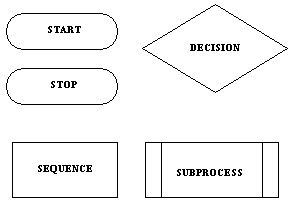 The major
symbols are the DECISION (also known as selection) and the SEQUENCE
(or process) symbols. The START and STOP symbols are called the
terminals. The SUBPROCESS symbol is a variation on the sequence
symbol. There are also connectors drawn between the symbols and you
will see these used in the examples below. There is at least one
other sequence symbol which is used to represent input/output
processes but I think it is unnecessary so I don't use it. The major
symbols are the DECISION (also known as selection) and the SEQUENCE
(or process) symbols. The START and STOP symbols are called the
terminals. The SUBPROCESS symbol is a variation on the sequence
symbol. There are also connectors drawn between the symbols and you
will see these used in the examples below. There is at least one
other sequence symbol which is used to represent input/output
processes but I think it is unnecessary so I don't use it.
There are some important rules concerning the symbols and these
rules apply also to other ways of stating algorithms:
| Processes have only one entry point and one exit point. |
| Decisions have only one entry point, one TRUE exit point and
one FALSE exit point. |
Repeat loop. Note that the repeat loop has the process
preceding the decision. This means that a repeat loop will always
execute the process part at least once. This is an important point
to remember because it may not be what you want to do. For instance
assume you are a world power in control of an arsenal of nuclear
weapons and have written a program to launch missiles in the event
of an attack. Your program contains a loop which launches a missile
each time you are struck by an enemy missile, for example:
REPEAT
LAUNCH MISSILE
UNTIL ENEMY STOPS
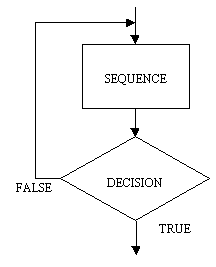
Is a repeat loop a good idea in this case? Probably not since, if we
assume you are not under attack and you run the program, the repeat
loop executes the process at least once and you will probably start
the next world war. A while loop would be a safer and more humane
choice

While loop. The while loop is basically the reverse of the
repeat loop, the decision comes first, followed by the process. The
while loop is usually written so that it iterates while the
condition is true, the repeat iterates until the condition
becomes true. An interesting question is: When should a repeat loop
be used rather than a while loop? and vice-versa. The while loop
should be used when it is possible that the process or processes
which are in the scope of the decision (that is, in the loop) may
not need to execute. For example assume you have a designed an
air-conditioner controller program and the program turns on the
compressor while the ambient temperature is above the desired
temperature. A while loop is a good choice here since the ambient
temperature may be at the desired level before the compressor part
of the program is executed. If a repeat loop was used then the
compressor would be turned on but it wouldn't be necessary. That
would be wickedly ignorant of green sensitivities. A repeat loop
would be a good candidate for the kind of situation in which a
program needs to check for an external event at least once. For
example: assume you have now written a program for a video cassete
recorder and it has a menu for doing things like tuning TV channels,
setting the date and time, programming events and so on. When the
menu is displayed it is a QUIT option along with all the others, the
VCR doesn't know which option will be chosen so it stays in the menu
mode, that is repeats it, until QUIT is selected.
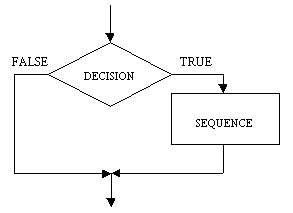 The
IF ... THEN construct is shown here and is also known as the
NULL ELSE, meaning that there is no ELSE part. I have use lines
with arrow-heads (connectors) to indicate the flow of sequence.
Although this is important in flow charts once you have gained
some skill in using them and if you draw them carefully you will
find that determining the sequence is straight forward. A
typical rule is to use arrow-heads on connectors where flow
direction may not be obvious. The
IF ... THEN construct is shown here and is also known as the
NULL ELSE, meaning that there is no ELSE part. I have use lines
with arrow-heads (connectors) to indicate the flow of sequence.
Although this is important in flow charts once you have gained
some skill in using them and if you draw them carefully you will
find that determining the sequence is straight forward. A
typical rule is to use arrow-heads on connectors where flow
direction may not be obvious. |
 The
IF ... THEN ... ELSE ... construct has a process at each branch
of the decision symbol. The only difference here is that each
value of the decision (TRUE/FALSE) has a process associated
with it. The
IF ... THEN ... ELSE ... construct has a process at each branch
of the decision symbol. The only difference here is that each
value of the decision (TRUE/FALSE) has a process associated
with it. |
Using flow charts to design programs
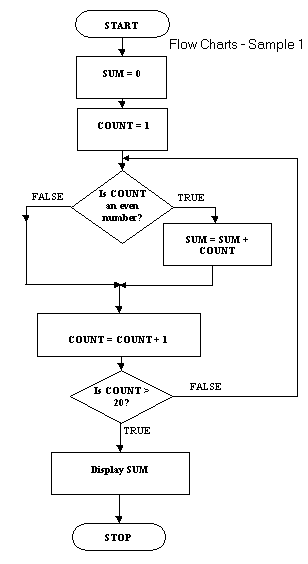 With
other topics I've explained the use of technique with an example.
There is something of a precedent there. This flow chart example
uses all the symbols except the subprocess symbol. With
other topics I've explained the use of technique with an example.
There is something of a precedent there. This flow chart example
uses all the symbols except the subprocess symbol.
The algorithm sums all the even numbers between 1 and 20 inclusive
and then displays the sum. It uses a repeat loop and contains a null
else within the repeat loop.
The equivalent pseudocode is:
sum = 0
count = 1
REPEAT
IF count is even THEN sum = sum + count
count = count + 1
UNTIL count > 20
DISPLAY sum
You can see quite clearly from this example what the price of
flow charting is. There is quite a bit of drawing to do in addition
to writing the legend in the symbols. The pseudocode is quite simple
by comparison so why would you use flow charts?
The major reasons are that the flow chart.
| is easier to read |
| more closely follows a standard, this is not the the case with
pseudocode |
| probably lends itself more readily to computer-aided
techniques of program design |
Some rules for flow charts
Well-drawn flow charts are easy to read. What must you do to draw
well-drawn flow charts? Here are a few rules:
- Every flow chart has a START symbol and a STOP symbol
- The flow of sequence is generally from the top of the page to
the bottom of the page. This can vary with loops which need to
flow back to an entry point.
- Use arrow-heads on connectors where flow direction may not be
obvious.
- There is only one flow chart per page
- A page should have a page number and a title
- A flow chart on one page should not break and jump to another
page
- A flow chart should have no more than around 15 symbols (not
including START and STOP)
If you study the examples here you should see the rules being
applied.
Exercise 1
Now it's time for you to try your hand at designing a program using
a flow chart.
Draw a flow chart and trace table for the following problem:
Fred sells bunches of flowers at the local shopping centre.
One day Fred's boss, Joe, tells Fred that at any time during the
day he (Joe) will need to know:
 | how many bunches of flowers have been sold |
| what was the value of the most expensive bunch sold
|
| what was the value of the least expensive bunch sold
|
| what is the average value of bunches sold |
There is a sample answer here but try it yourself first.
Flow charts and subprocesses
There is one last topic to do while we are running hot on flow
charts - dealing with subprocesses. Remember that when you studied
pseudocode you learned about subprocesses and the benefits of using
them.
The subprocess is useful because:
| it provides a means of simplifying programs by making common
processes available to a wide number of programs. |
| it permits the modularisation of complex programs. |
| it makes for more reliable programs since once it is shown
that a process works then it can be made a subprocess and need not
be tested again. |
In flow charts subprocesses are also useful in dealing with the
flow charting rule that a flow chart should have no more than 15 or
so symbols on a page.
Here is an example of the use of subprocesses in flow charts:
 |
This is the main page of the
flow chart and it contains two subprocess symbols. Each symbol
contains some legend which describes briefly what the subprocess
does. Each symbol also contains a page reference which indicates
where the subprocess flow chart is.
Note that the flow chart has a title and a page number.
|
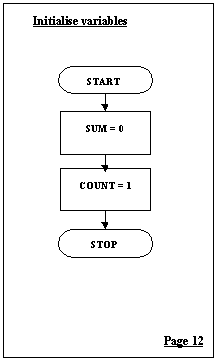 |
and here is page 12! |
 |
The Add even number
subprocess appears on its own page as indicated by the main flow
chart on page 1. |
A subprocess flow chart can contain other subprocesses, there is no
limit to how deeply these could be nested.
Exercise 2
With your answer for Exercise 1 modify the flow chart so that it has
a main flow chart and shows each of the following as subprocess flow
charts:
| the initialisation of the variables |
| the process or processes for calculating how many bunches
of flowers have been sold |
| the process or processes for calculating what was the value
of the most expensive bunch sold |
| the process or processes for calculating what was the value
of the least expensive bunch sold |
| the process or processes for calculating what is the
average value of bunches sold |
| the display of all the results |
I have a sample answer here but as with all the others resist the
temptation to look at this first.
Using nested loops in flow charts
 |
The nested while loop is shown here. This
example is much simplified, it doesn't show any initialisation
of either of the loops, the outer loop doesn't do any processing
apart from the processing the inner loop, neither loop shows any
statements which will lead to the termination of the loops.
Each single step through the outer loop will lead to the
complete iteration of the innner loop. Assume that the outre
loop counts through 10 steps and the inner loop through 100
steps. The sequence in the inner loop will be executed 10 * 100
times. Nested loops will do a lot of work.
|
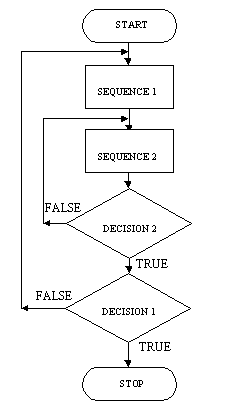 |
The repeat loop shown here, like the while
loop example, is much simplified. It does show two processes,
sequence 1 and sequence 2, one process in the outer loop and one
process in the innner loop.
Like the while loop the nested repeat loop will see a great deal
of work done. If the outer loop does a thousand iterations and
the inner loops does a thousand iterations then sequence 2 will
be executed 1000 * 1000 times.
|
Using multiway selection in flow charts
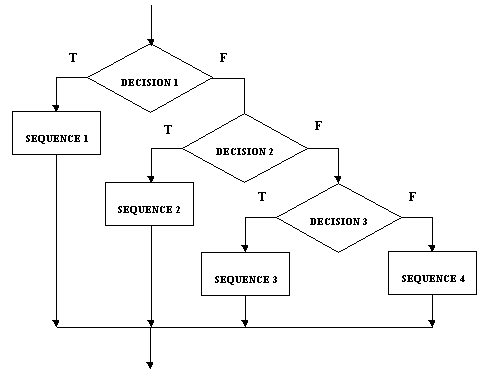
The flow chart form of multiway selection is shown here. You can see
it how it shows quite clearly the notion of decisions nested within
decisions.
If decision 1 is true then sequence 1 is executed and the multiway
selection is finished. If decision 1 is false then decision 2 is
tested, if this is true then sequence 2 is done and the multiway
selection is finished. If decision 2 is false, you get the picture.
Exercise 3
Here is exercise 3 again from one of the pseudocode lessons. It has
been only slightly modified:
Assume you have the following data stored somewhere:
Fred,Joan,Brian,Bert,Selie,Sue,Jack,Ng,Jacques,CLASS,Chris,
Cheryl,Pam,Allan,CLASS,END and it represents students in
different classes.
Design a program using flow charts which:
| reads the data and displays the names of the students in the
class |
| counts the number of students in each class |
| counts the number of classes |
There is a sample answer here but attempt the exercise for
yourself before looking at the sample.
Exercise 4
Rewrite the nested loops and the multiway selection from above as
pseudocode.
There is a sample answer here but attempt the exercise for yourself
before looking at the sample.
Summary
In this lesson you studied flow charting, which is the third of the
program design techniques on our list, there is just one to go. You
should have learned
| what program flow chart is |
| what symbols and constructs are used in drawing flow charts
|
| what the guidelines are for drawing flow charts |
| how to use flow charts in program design |
| how to use subprocesses in flow charts |
| how to use nested loops in flow charts |
| how to use multiway selection in flow charts |
You should also have learned a little bit more about loops and
decisions and gained some more practice at designing programs. You
will probably agree that flow charts, although easy to read, are a
fairly time-intensive way of program design.
|
|
|
| |
Notice: These notes are intended to be a supplement, not a substitute, to
attending class.
|