
Many people don't put anything in the Main
Menu, but I do.
These popups appear as part of the tool bar up top
to the right of the Help button.
The rule of thumb for loading popups from other
folders is the same as for aliases.
If your other folder has popups in each of the things shown here,
you must load them seperately.
They are:
servpop
chanpop
popups
mainmenu
msgpop
This is what shows after you click on the button.

( I didn't show the lower half of the window)
Click the and the
following window will appear
and the
following window will appear
after you click on the down arrow key.
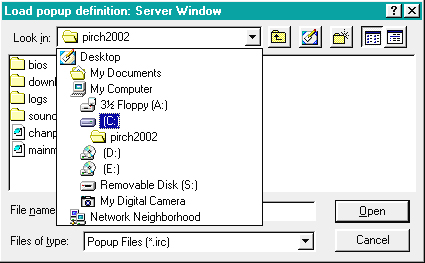
Click on the C: and the following window will appear.
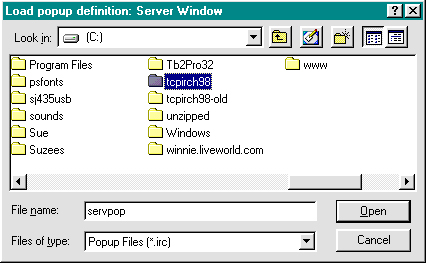
Double click on the folder you want to load in and
the following window will come up
(This is the part where you ignore my stuff in the lower
part of my window except for servpop)
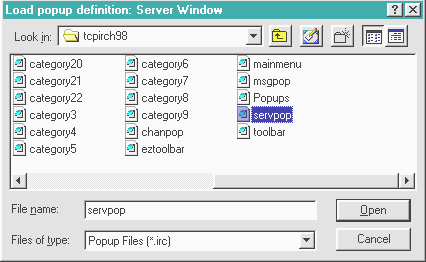
Double click on servpop then click Open
You servpops are now loaded. Only step left it to click on the mark
mark
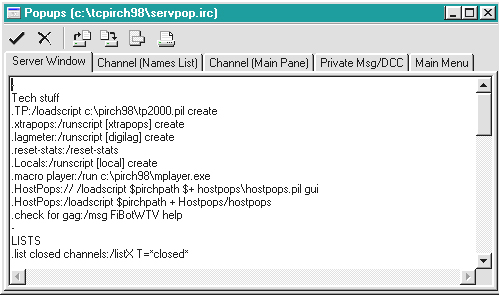
Follow the same procedure for the rest of the
files, and always remember to Save
by clicking on themark
Downloading &
Installing
Logging On
Setting Prefs Page One
Setting Prefs Page Two
How to Copy & Paste
Aliases and Popups
How to group popups
How to make Events
How to load aliases from
another file
How to Add a Pil
Combining popups and
aliases
How to add Networks and
their servers
Adding Server addresses
