
19) ba^y gio*` no'i to*'i "interactive" tab
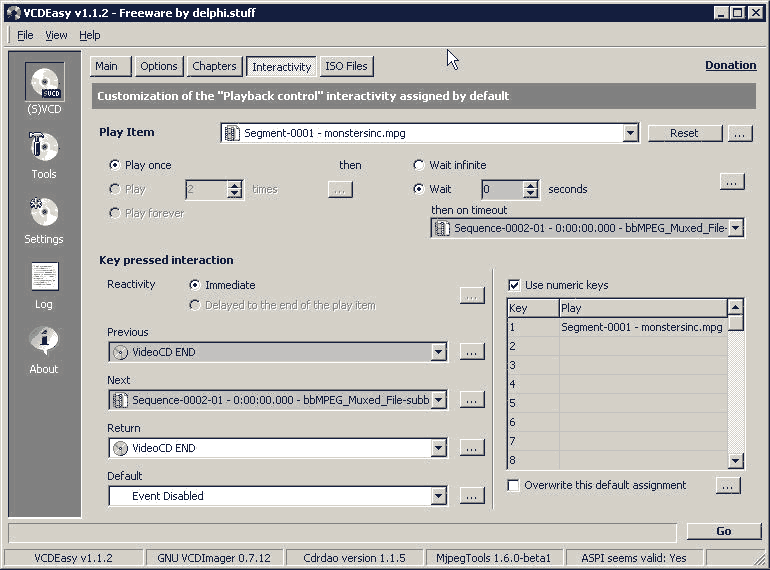
19a) Ct muo^'n ca'i cd na`y khi play se? play theo thu*' tu*. nhu* sau
1) play dvdcover cho 5 sec
ru`i tu*. ddo^.ng nha?y to*'i ba`i dda^`u tie^n
2) khi ba`i dda^`u tie^n ha't xong thi` nha?y to*'i ba`i ke^' tie^'p va` so
on
3) can skip to previour or next song using the |<< or >>| on the
remote
4) CT can cho.n ba`i ha't ba(`ng ca'ch ba^'m so^' tre^n remote (so^' 1 la` ba`i
so^' 1, so^' 2 la` ba`i so^' 2, etc)
5) sau khi ha't xong ba`i cuo^'i thi` se? tu*. ddo^.ng nha?y to*'i changecd
image va` ca'i changcd image na`y se? hie^.n le^n hoa`i dde^'n khi na`o CT la^'y
cd ra kho?i ma'y thi` tho^i. so how can I do this in the interactive tab
19a1) cho.n ca'i dvdcover mpg trong "play item" va` cho.n "play once" va` "wait" for 5 sec
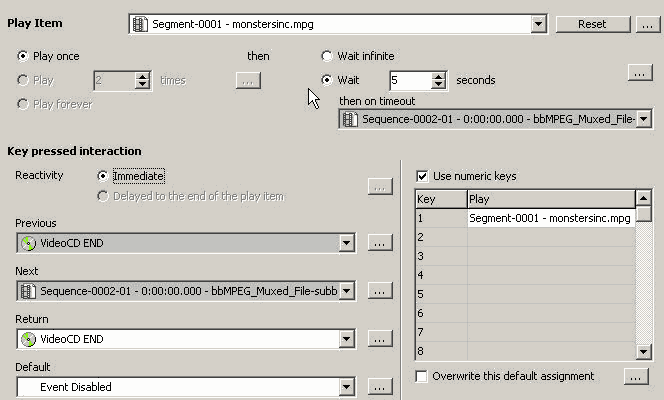
19a2,3,4) trong play item cho.n the main mpg, make sure it "play once" va` wait zero sec (just use the default set by vcdeasy)

19a5) cho.n ca'i changecd mgp trong "play item" va` make sure it "play forever"

20) Click on Go
21) after vcdeasy finish, it will generate a bin/cue file. Mount this bin/cue file using daemon tool va` du`ng windvd player dde^? play va` test out the entry point
Open IFO || VCDEasy || SVCD Main Tab || SVCD Option Tab || SVCD Chapters Tab || SVCD Interactive Tab || Go to DVD2SVCD Tutorial
