
The Craft
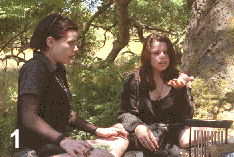 In the butterfly sequence of the film, the actresses are sitting
under a tree summoning a sign from a powerful god-like entity.
We get a hint of something magical in the air when hundreds of
monarch butterflies begin swarming into the scene from above.
Actress Neve Campbell reaches out for a butterfly that flutters
to a landing on her finger. This scene was originally attempted
as a practical shot (with real monarchs), but quickly ended when
the butterflies were released and they all split in the other
direction. To salvage the shot, the actresses were directed to
react to imaginary butterflies and computer animation would be
used to add the swarm of monarchs (Figure 1). The following is a description
of the process used to produce the CGI effect (Computer Graphics
Imagery).
In the butterfly sequence of the film, the actresses are sitting
under a tree summoning a sign from a powerful god-like entity.
We get a hint of something magical in the air when hundreds of
monarch butterflies begin swarming into the scene from above.
Actress Neve Campbell reaches out for a butterfly that flutters
to a landing on her finger. This scene was originally attempted
as a practical shot (with real monarchs), but quickly ended when
the butterflies were released and they all split in the other
direction. To salvage the shot, the actresses were directed to
react to imaginary butterflies and computer animation would be
used to add the swarm of monarchs (Figure 1). The following is a description
of the process used to produce the CGI effect (Computer Graphics
Imagery).
Similar techniques were used in the long-shot that leads into
the close-up described above. In this case
the butterfly shadows are being cast on the tree as they descend
into the scene. The end result is a very convincing effect that
audiences will be hard-pressed to recognize as computer graphic
imagery. Creating a photorealistic effect is one of the greatest
challenges for an animator. While there is rarely a direct path
to the desired result, the process of evaluating the roadblocks
and uncovering creative solutions along the way is what keeps
the work stimulating.
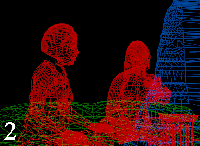 Stand-in geometry: The first step was to recreate a 3D
model of the scene from the camera's perspective. Figure 2 shows
the wireframe meshes that were animated to
match the motion of the actresses in the source footage. These
meshes are used as matte objects to mask the CG butterflies that
will fly behind them. In addition, the models serve as a three-dimensional
reference for the butterfly choreography and will also be used
to receive shadows in a later step.
Stand-in geometry: The first step was to recreate a 3D
model of the scene from the camera's perspective. Figure 2 shows
the wireframe meshes that were animated to
match the motion of the actresses in the source footage. These
meshes are used as matte objects to mask the CG butterflies that
will fly behind them. In addition, the models serve as a three-dimensional
reference for the butterfly choreography and will also be used
to receive shadows in a later step.
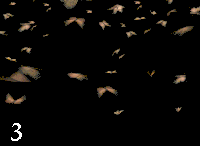 Choreography and Tracking:
I was able to establish logical
and convincing motion paths for the animated butterflies by studying
the sight-lines and "reactions" of the actresses to
the imaginary creatures. Due to their erratic flight patterns,
the illusion of swarming butterflies in the periphery could not
be accomplished successfully with flocking routines. It
became clear that each ne had to be animated individually.
With hundreds of unique flight patterns pulled together in the
scene we get a very realistic sense of butterfly chaos - yet each
is still convincing on its own. Figure 3 shows a rendering of
the butterflies against a black background.
Choreography and Tracking:
I was able to establish logical
and convincing motion paths for the animated butterflies by studying
the sight-lines and "reactions" of the actresses to
the imaginary creatures. Due to their erratic flight patterns,
the illusion of swarming butterflies in the periphery could not
be accomplished successfully with flocking routines. It
became clear that each ne had to be animated individually.
With hundreds of unique flight patterns pulled together in the
scene we get a very realistic sense of butterfly chaos - yet each
is still convincing on its own. Figure 3 shows a rendering of
the butterflies against a black background.
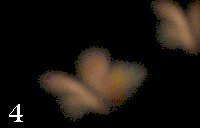 Depth-of-field: In Alfred Hitchcock's The Birds,
an incredible sense of volume and depth was achieved by compositing
extra layers of birds in the extreme foreground. This effect was recreated
by animating three layers of butterflies that dart
in and out of the camera's field of view at close range. Each
level was blurred heavily to simulate the camera's depth of field.
This technique also has the advantage of multiplying the perceived
quantity of monarchs to some ferocious number. Figure 4 shows
one of these butterflies in the extreme foreground.
Depth-of-field: In Alfred Hitchcock's The Birds,
an incredible sense of volume and depth was achieved by compositing
extra layers of birds in the extreme foreground. This effect was recreated
by animating three layers of butterflies that dart
in and out of the camera's field of view at close range. Each
level was blurred heavily to simulate the camera's depth of field.
This technique also has the advantage of multiplying the perceived
quantity of monarchs to some ferocious number. Figure 4 shows
one of these butterflies in the extreme foreground.
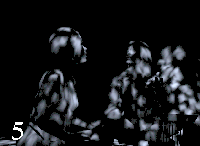 Shadows: CGI shadows were cast into the 3D scene
as an entirely separate element. This element consists of white
butterfly shadows (only) moving over the contours of 3D geometry
in a solid black environment (Figure 5). With custom SPI
software, the white areas subtract luminance (intensity) from
the source plates which result in dark areas that appear as shadows
in the final rendering.
Shadows: CGI shadows were cast into the 3D scene
as an entirely separate element. This element consists of white
butterfly shadows (only) moving over the contours of 3D geometry
in a solid black environment (Figure 5). With custom SPI
software, the white areas subtract luminance (intensity) from
the source plates which result in dark areas that appear as shadows
in the final rendering.
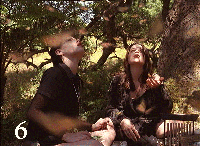 Final processing and composite: CG "film grain"
was added to the renderings for a natural blend with the source footage. All of the elements were then pulled together for the
final composite. This includes the main butterfly animation, three layers of foreground butterflies and two levels
of shadows. The final result is shown in Figure 6.
Final processing and composite: CG "film grain"
was added to the renderings for a natural blend with the source footage. All of the elements were then pulled together for the
final composite. This includes the main butterfly animation, three layers of foreground butterflies and two levels
of shadows. The final result is shown in Figure 6.
See the butterfly animation process in action!
Quicktime or AVI Approx. 1.5 MG
Take a look at snake morphing!