
|
SimsPegasus Beds Tutorial-2 - Page 6 Tutorials home |
||||
| Goal: How to insert more than one animation to your Heartbed template and make them be shown in a menu pie | ||||
| What you are going to need: | ||||
|
1-IffPencil 2 |
||||
|
2-Animation Alchemist |
||||
| 3-Amorphis Xmas animations , (or some animations you have , but you must know each animation name and action in this case.) | ||||
| Previous Tutorial | ||||
| Beds with adult animations are one of the most wanted objects so we decided to help you attach more than | ||||
| one animation to them and make the object show the animation options in a menu pie in the game. | ||||
| We made this tutorial with only one mail goal in mind: To help all sims players to make their own love beds. | ||||
| D) Using Iffpencil 2 to set the menu pie | ||||
| 1-Ok, click on
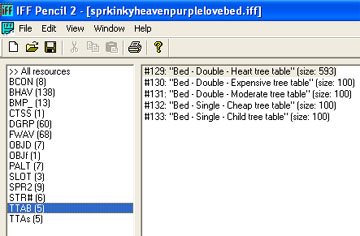
TTAB see where it is? look at this image please This is the Interaction Menu Editor where the menu is made and also where it connects the menu options with the Bhav resources we've been adding and modifiying just a few minutes ago., |
 |
|||
| On the right
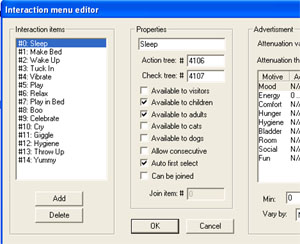
column we see there's a #129, please double click on it., take a look at the
options on the left column and you'll see here our #4 "vibrate" and #7 "play
in bed" menu options , the ones the regular Maxis love bed shows when you
click on it.As we have changed the animation for them, we 're gonna
change this names as well. Click on #4 vibrate , edit it's properties and
write Have sex/Ride over bridge
replacing Vibrate ,don't click on the ok button till we tell you
so,right? Have sex will be the main
option and Ride over bridge will be one
of the 2 suboptions we'll have. You can also change here the values for
available to visitors, by cheching it and
it'd be good you unchecked the available to
children option lol. On the right column you can change the motives for comfort , energy etc, dont' put them above 90 or your beds will have quite a high attraction . Ok , click on #7 Play in bed , and replace it's properties writing Ride over bridge here. We're done with Maxis menu now, but we'll need to add a new set of options for the new animation we added some eons ago (doll-deep and guy-deep ,remember?) |
 |
|||
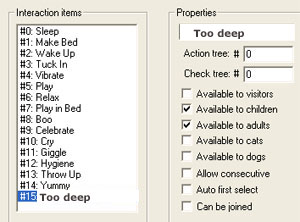
| 2- Right click on #14 Yummie, the last one on the list. Choose Add . #15 is available now and we can edit it's properties and write our next option TOO DEEP here. |
 |
|||
| We need to connect this option to where the real action is, so we're going to write #4216 in our action tree inputbox. (our interaction pixelate in Bhavs resources) and to complete the check tree value we'll write 4215 (our interaction join2 test) |
 |
|||
| Each one menu pie option's got 3 parts, the one we've recently set is to be shown when you click on a sim to invite him/her to bed. Now we're going to set the other 2: | ||||
| Our picture here's showing
more than you've got to do , don't worry :). Click on #15 and select Add, a new item will show last on list now, this will be the hidden action, what is this? well let's say it happens when somebody joins you without invitation lol., So we need to name this option hidden Too Deep, let's do it., For the action tree value use :4216 (interaction pixelate), and for check tree value : 4134 which means :"interaction pixelate TEST" for the bhavs. You can also change values for :available to visitors etc, make sure available to children is unchecked .
|
 |
|||
| 3-Good, now to our main menu pie option: | ||||
| Click on #16 and select Add, you'll get #17 yep you guessed right here. We 'll name it Have Sex/Too Deep | ||||
| Done? good!, now
change the value for : Action tree 4220,
this one connects the menu to our Interaction
vibrate 1 , then change the value for Check Tree
:4132 this connects the menu to
Interaction Vibrate TEST in the Bhavs resources. , Now we need
to tell this option which one is it calling , when the bed is in the game
and we click on it and for instance we take our male to bed to do the"too
deep" we select "have sex" and then "too deep" right? , ok how does this
menu know the other sim will do this action? , notice there's a last check
box "can be joined" , right, let's check it, we'll see there's a Join Item
input box waiting for our values, our Too deep for the invited sim is #15 ,
so we must write 15 here. Check available to visitors and uncheck available to children. Click ok when you're done with the menu.
|
||||
| Good news my friends!! you've just made a kinky love bed with a 2 options menu pie!!!! | ||||
| Extras: How to make the bed available for people who's not in love: | ||||
| It's pretty unfair we cannot invite anybody to bed , ha! well we can change it, and it's not very difficult, ready to go? Let's play ball then! | ||||
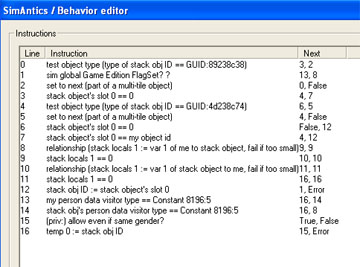
| On the Bhavs resources , double click on #4184 (are we in love?). this is what you get: | ||||
 |
||||
| And this is how it should be: |
 |
|||
| how are we doing this? | ||||
| Ok go and click on
line 16 ,the last one, it's values must be exactly what we're seeing here in
the picture:
So edit the values and change them like here: Go to line 15, delete the true line and false line values , replace them with 0. Right click on line 15 and delete it. You must do it with all the lines above the last one we modified till it becomes line 0 and the only one here., then click ok. |
 |
|||
| Don't forget to save your file before leaving IffPencil 2, you 'd run nuts if you didn't save it I know. | ||||
| Well, we've finally made it!!! I hope you've enjoyed the explanation and may this be very useful to you ! | ||||
| Here's wishing you make tons of new beds and add any animation you want to them! | ||||
| In case you 'd like to add more than 2 animations , you need to repeat steps from page one of this tutorial A )Using IffPencil 2 to attach animations. to Using Iffpencil 2 to set the menu pie here in this very page . Good Luck! | ||||
| Previous Page | Back to SimsPegasus | |||
