
|
SimsPegasus Beds Tutorial-2 - Page 1 |
|||
| Goal: How to insert more than one animation to your Heartbed template and make them be shown in a menu pie | |||
| What you are going to need: | |||
|
1-IffPencil 2 |
|||
|
2-Animation Alchemist |
|||
| 3-Amorphis Xmas animations , (or some animations you have , but you must know each animation name and action in this case.) | |||
| Previous Tutorial | |||
| Beds with adult animations are one of the most wanted objects so we decided to help you attach more than | |||
| one animation to them and make the object show the animation options in a menu pie in the game. | |||
| We made this tutorial with only one mail goal in mind: To help all sims players to make their own love beds. | |||
| A )Using IffPencil 2 to attach animations. | |||
| 1-Run IffPencil 2 and open your new bed (it's bedhearttest2,iff for me). See all the resource tabs shown in the left column? ok, Click on STR#(6) (6 means it's got 6 elements). | |||
| 2-On the right
column double click on #129 a20 , this is where animation resources
are shown We're gonna give you some tips here: #3=sleep animation for male / #4 sleep animation for female. #70-start sex for male/#73 start sext for female #80 -finish sex for male/ #83 finish sex for female #75 is where Maxis shows them underneath the covers lol (male animation) #85 is where the Maxis female animation goes underneath the covers too lol. If you intend to make a bed with only one sex animation well, you can only change all the ones we've just named. If you are like me and would love to have more than one animation shown in a menu pie , then go on reading this tutorial.
|
 |
||
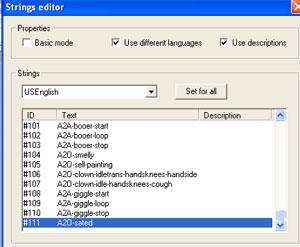
| 3-Go down till #111 (a20-sated) is shown : |
 |
||
| 4-right click on #111 and select Add, you will sure get #112 "new item" |
 |
||
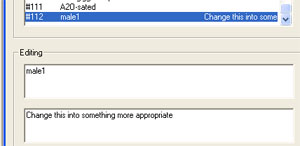
| 5-Edit and change "new item" to "male1" as this will be another male animation for us. |
 |
||
| 6-You don't need to click on the OK button, its already changed , see? |
 |
||
| Previous Page | Back to SimsPegasus | ||
