
|
SimsPegasus Beds Tutorial-2 - Page 2 Tutorials home |
|||
| Goal: How to insert more than one animation to your Heartbed template and make them be shown in a menu pie | |||
| What you are going to need: | |||
|
1-IffPencil 2 |
|||
|
2-Animation Alchemist |
|||
| 3-Amorphis Xmas animations , (or some animations you have , but you must know each animation name and action in this case.) | |||
| Previous Tutorial | |||
| Beds with adult animations are one of the most wanted objects so we decided to help you attach more than | |||
| one animation to them and make the object show the animation options in a menu pie in the game. | |||
| We made this tutorial with only one mail goal in mind: To help all sims players to make their own love beds. | |||
| A )Using IffPencil 2 to attach animations. | |||
| 7-Right click
again and "add" another resource , this will be 113
we will edit it and name it female1, ok? Click now on the OK button You may need to make a backup of the bed file before saving your work just in case, so do it now. The backup is done ? ok save your work and leave iffpencil2 |
|||
| B) Using Animation Alchemist to insert our animations. | |||
| 1-We need
Animation Alchemist and some animations ,we'll use
some of Amorphis Xmas animations in this tutorial so you also
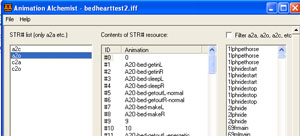
need to have them. Ready? ok run Animation Alchemist, using file open , open your bedhearttest2.iff file. Uncheck "filter a2a ,a2o,a2c etc." We need to uncheck it otherwise we wouldn't see our animations since they don't start with "a2o etc".
|
 |
||
| 2-Select a2o from
left column. On the STR list column click on "a20" |
 |
||
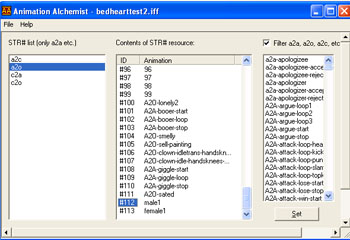
| 3-Look down till you find our additions 112 male1 and 113 female1 , here they are , see them? ok! |
 |
||
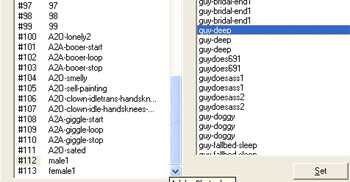
| 4-We'll use guy deep" animation here so look for it till your find it on the right column |
 |
||
| Previous Page | Back to SimsPegasus | ||
