
|
SimsPegasus Beds Tutorial-2 - Page 3 Tutorials home |
|||
| Goal: How to insert more than one animation to your Heartbed template and make them be shown in a menu pie | |||
| What you are going to need: | |||
|
1-IffPencil 2 |
|||
|
2-Animation Alchemist |
|||
| 3-Amorphis Xmas animations , (or some animations you have , but you must know each animation name and action in this case.) | |||
| Previous Tutorial | |||
| Beds with adult animations are one of the most wanted objects so we decided to help you attach more than | |||
| one animation to them and make the object show the animation options in a menu pie in the game. | |||
| We made this tutorial with only one mail goal in mind: To help all sims players to make their own love beds. | |||
| B) Using Animation Alchemist to insert our animations- continues from page 2 | |||
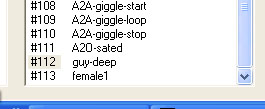
| 5-Once you have
both "112" and
"guy-deep" selected, press the
set button and you're done. Now let's do the female1, select 113 and then look for doll-deep in your right column, once selected ,press set again and it's done!! , now we have a new animation added to a new animation resource!. Would you like to use Maxis #75 and #85 inputs for animations? , why don't you use guy-rideoverbridge for #75 and doll-rideoverbridge for #85? this way you're going to have a bed with 2 animations, I suggest you do it right now! Done? Very well then : Fun hasn't started yet, wait and see! |
 |
||
| C- Using Iffpencil 2 to make room for our animations | |||
| 1-We need to run
IffPencil 2 again, well just do it. In order to change bhav in iffpencil
matching the resources added for animations Each animation must have these elements:
This part is very important, if we don't do it nothing will happen in our bed lol. A very important thing to know is we also need another INTERACTION JOIN TEST (#4187) So right click on #4187 Interaction Join TEST select duplicate and name your new duplicatet #4215 Interaction Join2 TEST and accept it. |
 |
||
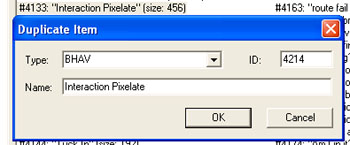
| 2-Right click on #4133 Interaction Pixelate and duplicate , name this duplicate #4216Interaction Pixelate (don't pay attention at our 4214 shown here in the image, it was just shot to show.) |
 |
||
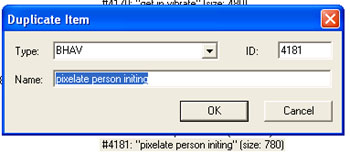
| 3-Right click now on #4181 pixelate person initing , duplicate it and name it #4218 pixelate person initing1 |
 |
||
| Right click on
#4135 vibrate interaction ,
duplicate it and name it
#4219 vibrate interaction1 Right click on #4131 Interaction Vibrate , duplicate it and name it #4220 Interaction Vibrate1 Right click on #4181 pixelate person B , duplicate and name it #4221 pixelate person B1 |
|||
| Done? wow what a mess! , it gets worse, just wait and see. Each one of these duplicates we've made 's got | |||
| an inner call to a program function line, and we need to change the call in order to give way to our animation, ready to do it? , wanna have some water ? maybe some coffee break now?, ok, come back when you're feeling less dizzy. | |||
| Back and renewed? ok, let's break this code and thanks heaven we've got IffPencil 2 to do this. | |||
| Previous Page | Back to SimsPegasus | ||
