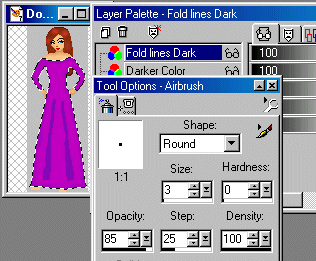
On this new layer, (mine is named "Fold lines Dark".) we are going to add the dark folds in the dress. We do this by using the darkest color and the Airbrush Tool. Set the size to around 3, Hardness: 0, Opacity: 85 and Density: 100. Now draw on the curvy folds of the dress, like this: (keep the lines below the waist. Don't draw them too high up. We need room to smudge them upwards.
 The first thing I do is take a shortcut. lol Using "Motion Blur" under "Effects" in Paint Shop, I set the motion like this: (See image).
 Then take your Retouch Tool and set it to "Smudge" using approx these settings: Brush Size: 9, Hardness: 0, Opacity: 30, Step: 1, and Density: 100. We will smudge downwards to make the folds. Have them spread out in a sort of "V" as seen below. You don't have to worry about going past the bottom edge. We can clean this up later on. Then we are going to smudge these lines upwards towards the waist just a bit and thin them out. You can always erase any that go up too far, if you need to. That's why we use multiple layers. You may have to practice with this a bit but it's worth it in the end.
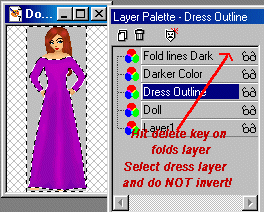
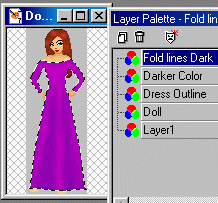 When you are finished with this step, we'll clean it up a bit. Go to the layer your main dress is on and select outside the dress. (I named mine "Dress Outline".) Then highlight (by touching it on your layer palette) the layer your shading is on and hit your "Delete" key on your keyboard. This will clear away any extra smudges that you don't need.
 Next
Next
|