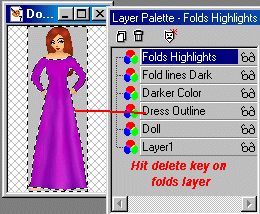
When you have the last step done, add a new layer (name it Folds Highlights) so that we can highlight the dress some. On this layer, use a lighter color and draw on the highlights. I used the airbrush set at 2. The other settings remain the same. First, the short cut...motion blur, same settings.
 Then using the smudge tool, you do as you did before and smudge the highlights until you have them the way you want them, beginning with a downward stroke first.
 Then go back to your Main Dress Layer (Outline Layer) and select outside the dress again. Then click on the highlight layer and hit your "delete" key on your keyboard. Now we have highlights and the dress is all cleaned up. :) Turn off your Doll Layer and the background layer...if you use one, and Merge the remaining layers...."Layers"...."Merge Visible".
 Just a few more steps and we'll be finished. Take your eraser and erase any hard edges on the dress, making sure to get those corners at the bottom and round them out a bit. You erase back towards the doll. This makes the dress look more natural. No dress goes straight across when it has folds in it.
 I also used the Retouch Tool: Darken RGB and Lighten RGB to make some shadows on the top of the dress so that she looks like she has breasts instead of one big lump. lol. This is an excellent set of tools for touch ups. Darken beneath and around the breast area and lighten on top.
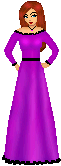
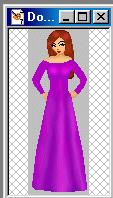 Now add some decor....a belt, a necklace, black lace, etc to the dress and voila...you're all finished and your doll is dressed up and ready to go.
 If you have any problems with this tutorial, email me using the email button at the bottom of this page. I am always glad to help out if I can.
|