|
Combining the incredible technology of the PLAYSTATION®2 computer entertainment
system with the endlessly versatile Linux operating system, Linux enthusiasts
and programmers can now use the same system they play their favorite PlayStation
games on to run thousands of Linux applications!
LINUX (FOR
PLAYSTATION®2) allows you to utilize the PlayStation®2 console as
a fully-functional desktop computer. Download a wealth of Linux programs --
HTML editors, multimedia players, programming environments, office solutions
and more -- and open a new world with the power of the next generation in
computer entertainment.
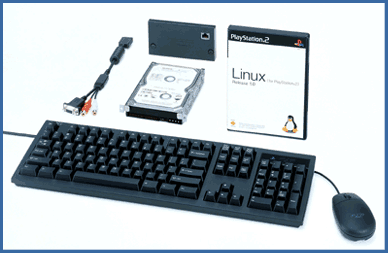
The kit
for LINUX (FOR PLAYSTATION®2) includes:
-Network
Adapter (Ethernet) [10/100 Base-T]: SCPH-10350E
-40 Gb Internal Hard Disk Drive (for PlayStation2): SCPH-20401E
-Monitor Cable Adaptor (for PlayStation®2) (with audio connectors):
SCPH-10320E
-DVD discs (2), containing Linux installation and run time discs
-USB keyboard: SCPH-10240E
-USB mouse: SCPH-10230E
-Technical documentation and software manual
REQUIRES A PLAYSTATION®2
CONSOLE, VGA MONITOR [WITH SYNC-ON-GREEN CAPABILITY] AND MEMORY CARD (8MB)
[DEDICATED TO LINUX KIT USE], ALL SOLD SEPARATELY.
- The
monitor cable adaptor is exclusively for use with the PlayStation®2 console,
and cannot be used with the PS oneTM or the PlayStation® console.
- This
adaptor does not function as an up-scan converter (a device that improves
output resolution). It cannot be used to view PlayStation 2 format software
on a multi-scan monitor, unless the software is marked as compatible with
the monitor cable adaptor (for PlayStation®2).
- An
audio extension cable (male/male) (not included) may be required for connection
to speakers with female audio input connectors. Output resolution may vary
depending on the software in use. For details, refer to the instructions provided
with the software.
- This
adaptor does not conform with VESA DDC and VESA DPMS standards*.
*VESA: Video
Electronics Standards Association, DDC: Display Data Channel, DPMS: Display
Power Management Signaling
|