Something to splash out on... - Written by SteM -
Level = Beginners
In this guide I'm
going to show my method that I used to create a 'splash screen'. (A pop-up
window which appears with a program logo as the program loads. E.g. - MS
Word). My method may not be the best, or it could be made better, but I
found it worked quite well and looked nice. Here we go...
1 - Making your
program logo:
The first thing
to do then, is to think of a design for your program logo. This will be
the main part of the window. Take into account the size of your design,
whatever size you make it, the window will need to be about the same. My
design is 342 x 342 pixels. Its up to you what program you use to create
your design, anything from Paint to Photoshop would be fine. I recommend
you use the same design size as above as this will work best with code I
have provided. (Step 2)
You may also want to add copyright info to your logo and your name. Also,
any other info you'd like to add. Once you've created your design, save it
as a BMP file and preview it, just to check you like the look of it.
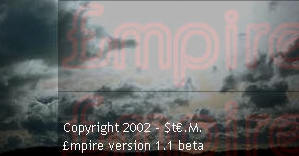
Above - My splash screen. (Sample) This should give you a better
idea of what I explained.
2 - The code
Now that you have your design, its time write the code which will put the
design into a window and start-up at the beginning of you program.
Firstly, open up LB and your programs code. Then, copy and paste the code
below at the beginning of your program:
[StartPopUp]
nomainwin
WindowWidth = same width as design
WindowHeight = same height as design + 40
UpperLeftX=int((DisplayWidth-WindowWidth)/2)
UpperLeftY=int((DisplayHeight-WindowHeight)/2)
BackgroundColor$ = "your preference"
ForegroundColor$ = "your preference"
bmpbutton #popstart.bmpbutton1, "Design directory", [bmpbutton1Click], UL,
-5, -23
statictext #popstart.statictext2, "Loading...", 80, 342, 164, 20
button #popstart.button4, "Continue", [buttonnClick], UL, 260, 327, 67, 25
open "program name" for window_popup as #popstart
print #popstart, "font ms_sans_serif 0 16"
print #popstart, "trapclose [buttonnClick]"
[popstart.inputLoop]
wait
[bmpbutton1Click]
wait
[buttonnClick]
close #popstart
goto [yourprogram]
Page 2...