


1. Go here to download Sun's Java compiler. Install the compiler.
Getting Started With Java
This tutorial will use the jGRASP development environment. You can get jGRASP here. It's free.
You'll also need to install the Java J2SE v 1.4.2_04 SDK. You can get that here
After both of those are installed your ready to get started.
It's time to try a program.
Start jGRASP
Select File > New File > Java
Type the following code into the window that appears:
public class HelloWorld
{
..
public static void main(String[] args)
..{
....
System.out.println("Hello World");
..}
}
Save it as HelloWorld.java
Click the compile button
Click the run button
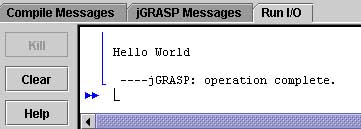
You should see this message: