|
HOME
Back to
Capture Solutions
Automated Forms Processing
Automated Image Processing
Bookeye
Diskviewer
High Speed Data Entry
Standard
|
| Capture Solutions:
BSCAN |
| Automated Image Processing |
|
 Now
compatible with:
Now
compatible with:
 |
| With
BSCAN-IP automated and manual image cleanup and quality
checking can be performed on PCs without scanners. A single
BSCAN-IP station can process over a million images per day,
depending on the number and types of image processing functions
and the speed of the computer. |
For
the ultimate in quality results, most of BSCAN-IPs image
processing functions are automatically checked and any
images that may have a problem are
flagged
for manual review and possible correction. If BSCAN's
undo Image Processing feature is enabled, all image processing
performed automatically can be manually undone and performed
again with different parameters in a later stage..
|
| Features
at a Glance! |
|
|
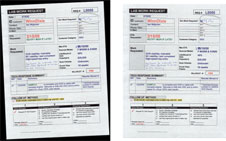
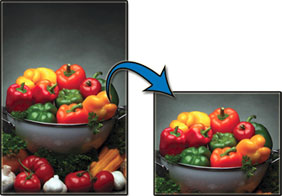
Removes
black borders and straightens skewed documents.
If a questionable crop and deskew is performed,
the image is flagged for later review and possible
manual crop and deskew using the mouse.
|
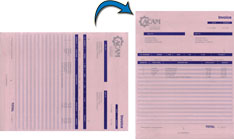
This
function is very effective with most types of documents.
If BSCAN has any doubt that a rotated image should
have been rotated, a flag is set for review and
possible correction.
|
|
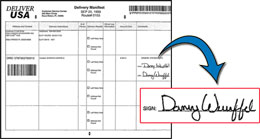
Automatically
clip sections of images and create new image files.
As shown below, this feature can be used to post
signatures from contracts or delivery receipts
to the WEB.
|
By
integrating form setup into run-time processing,
it is not necessary to know the types of all
forms before any processing can be done. New
forms are set aside for quick setup, allowing
production to continue with minimal hold-up
for new forms.
|
|
|
|
Form
Training Made Simple
By
integrating form setup into run-time processing, it
is not necessary to know the types of all forms before
any processing can be done. New forms are set aside
for quick setup, allowing production to continue with
minimal hold-up for new forms.
|
| |
| Automatically
Delete Blank Pages
With
this feature, if a page is blank, it is automatically
flagged for deletion. If there is a chance that
it has any content, a small scribble for example,
then the page is flagged for review. During review,
the flag for deletion can be turned off and on.
|
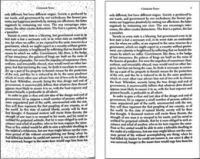
Despeckle
This
function has numerous filters for removing various
speck sizes. If the text is very light, it is
possible that despeck will further lighten the
text. During the automatic processing, if BSCAN
despeckles an image and senses a possible loss
of readability, the image is flagged for review
and correction
|
Scan
Quality Tests
These
test check for the possibility of tex dropout,
badly skewed scanning and general clarity.
| Review
Orientation |
May
be upside-down |
| Review
DRS |
May
need DRS tuning |
| Review
Crop & Deskew |
May
need manual Crop & Deskew |
| Review
Color Dropout |
Color
dropout needs review |
| Review
for Content Image |
May
not be blank |
| Review
Borders for Content |
May
have lost data around border |
| Review
Despeckle |
May
have removed good data |
|
|
| |
|
|
Dynamic Resampling
Software allows images
to be rescanned on a non-scanner workstation long
after they were originally scanned. If DRS is automatically
performed, images with potential problems are flagged
for manual review and correction by changing DRS settings.
A grayscale or color scanner is required. |
|
|
|
|
|
Put our imagination, experience,
and expertise to work for you. Discover
our excellence in
Bringing your files down
to size.SM Learn
more about how forward thinking organizations
are keeping ahead of their competition. Contact us for
more information.
|
 |
|
| |
|
|