|


| |
Technical note : adding
entry on system menu
This session is intended as a simple tutorial on specific matter. Every
reader can use this material as he wish , provided not responsability I will assume for
mistakes I will do writing this article. People willing to give some contributes to enrich
this work, my be pointing out some error or sending me material which should be integrate
this article are strongly invited to do so , mailing me at enzo.arlati@iname.com
|
-
- The topic covered in this session is related the way you can
manipulate programmaticaly the system menu using delphi.
-
|
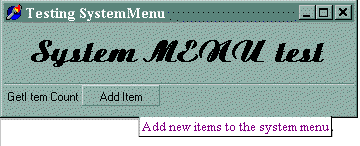
| To explain this we will ealize a simple
application with two button. The first button
GetItemCount simply display in a dialogBOX the number of items actually in the
system menu |
 |
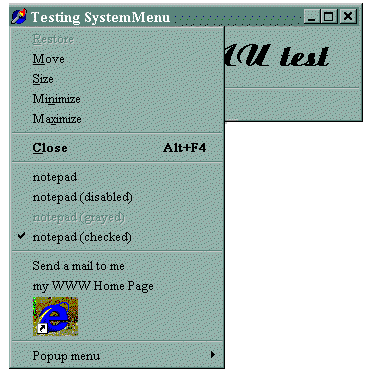
| The button AddItem add some
extra items to the system menu as show in the picture on the left. You get several items with different status and appearance.
The group of items related to notepad are showed in normal,
disabled, grayed and checked mode, while there are to items that call the default browser.
The first one is displayed as simple string 'my WWW Home
Page' while the second is just a bitmap showing IE4 logo. |
 |

Belowe I will deep in the interesting point. If you will look at the whole source code look at source code or download the full source code or the
executable demo program
- The first step to manage with a system menu is to get is handle.
- You can get it using then function GetSystemMenu as show in the
sample code showed belowe.
- Once you get this handle you can use a wide set of API for manipulate a menu ( see list ).
- In this simple example we get the menu handle and the trough the API GetItemCount we
also get the number of items in the specified menu.
|
procedure TForm_SystemMenu.btn_GetItemCountClick(Sender:
TObject);
var
h: hMenu;
nItem: integer;
begin
h := GetSystemMenu( TForm(self).handle, false);
nItem := GetMenuItemCount( h );
messageDlg( format('Items in system menu: %d ', [nItem] ),
mtInformation, [mbOK], 0 );
end; |
- Now let's go on and considering some more useful functionality.
- We want to add some extra item to the standard system menu of this application and
enable it to fire some action like call notepad or standard e-mail or browser.
The first target, add some extra items to the system menu is obtained as show in the
example belowe.
Once you get the handle of the system menu simply call the API AppendMenu
( or InsertMenu if you like ) to add the items as you want.
|
procedure TForm_SystemMenu.tb_addItemClick(Sender: TObject);
var
h: hMenu;
str1: string;
begin
h := GetSystemMenu( TForm(self).handle, false);
AppendMenu(h, MF_SEPARATOR, 0, '' );
AppendMenu(h, MF_STRING, WM_MENU_1, 'notepad' );
AppendMenu(h, MF_STRING + MF_DISABLED, WM_MENU_1, 'notepad
(disabled)' );
AppendMenu(h, MF_STRING + MF_GRAYED, WM_MENU_1, 'notepad
(grayed)' );
AppendMenu(h, MF_STRING + MF_CHECKED, WM_MENU_1, 'notepad
(checked)' );
AppendMenu(h, MF_SEPARATOR, 0, '' );
AppendMenu(h, MF_STRING, WM_MENU_2, 'Send a mail to me' );
AppendMenu(h, MF_STRING, WM_MENU_3, 'my WWW Home Page' );
AppendMenu(h, MF_BITMAP, WM_MENU_3, pchar( bm.handle ) );
AppendMenu(h, MF_SEPARATOR, 0, '' );
AppendMenu(h, MF_POPUP, popupMenu1.handle, 'Popup menu' );
end; |
WM_MENU_1, WM_MENU_2 and WM_MENU_3 are constant defined like this:
|
const
WM_menu_1 = wm_user + 1;
WM_menu_2 = wm_user + 2;
WM_menu_3 = wm_user + 3; |
- These value identify the custom messages associated to the new items added to system
menu.
- The API AppendMenu(h, MF_STRING, WM_MENU_1, 'notepad' ); simply means that
when you press the menu items 'notepad' the application will receive the message wm_user_1
- Then you simply defined a function that handle the message wm_syscommand
, the message sended when some items on the system menu is fired, defined like this:
-
procedure WMSysMenu(var Msg: TMsg); message WM_SYSCOMMAND;
- An example of this function is show belowe.
- You must check if the message received from the system menu if one of your messages.
- If the message is one of your the handle it and exit , otherwise call the parent method
( using the inerithed statement ) which will handle all the other system messages in the
standard way.
Remember ; don't forget to call the parent member or your
application can't be handle some important messages and hang on
|
procedure TForm_SystemMenu.WMSysMenu(var Msg: TMsg);
var
str1: string;
begin
case msg.message of
wm_menu_1:
winexec( 'notepad',
sw_show );
wm_menu_2:
Shellexecute( 0,
'open', Pchar('mailto:enzoarlati@iname.com'),
nil, nil, sw_normal );
wm_menu_3:
Shellexecute( 0,
'open', Pchar('http://www.geocities.com/SiliconValley/Lab/7311/'),
nil, nil, sw_normal );
else inherited;
end;
end; //____________ WMSysMenu......
|
|
Summary
of functions availabe to works with menus
function
function GetSystemMenu(hWnd:
HWND; bRevert: BOOL): HMENU; stdcall;
function CreateMenu: HMENU; stdcall;
function CreatePopupMenu: HMENU; stdcall;
function DestroyMenu(hMenu: HMENU): BOOL; stdcall;
function CheckMenuItem(hMenu: HMENU; uIDCheckItem, uCheck: UINT): DWORD; stdcall;
function EnableMenuItem(hMenu: HMENU; uIDEnableItem, uEnable: UINT): BOOL; stdcall;
function GetSubMenu(hMenu: HMENU; nPos: Integer): HMENU; stdcall;
function GetMenuItemID(hMenu: HMENU; nPos: Integer): UINT; stdcall;
function GetMenuItemCount(hMenu: HMENU): Integer; stdcall;
function InsertMenu(hMenu: HMENU; uPosition, uFlags, uIDNewItem: UINT; lpNewItem:
PChar): BOOL; stdcall;
function AppendMenu(hMenu: HMENU; uFlags, uIDNewItem:
UINT; lpNewItem: PChar): BOOL; stdcall;
function ModifyMenu(hMnu: HMENU; uPosition, uFlags, uIDNewItem: UINT; lpNewItem:
PChar): BOOL; stdcall;
function RemoveMenu(hMenu: HMENU; uPosition, uFlags: UINT): BOOL; stdcall;
function DeleteMenu(hMenu: HMENU; uPosition, uFlags: UINT): BOOL; stdcall;
function SetMenuItemBitmaps(hMenu: HMENU; uPosition, uFlags: UINT; hBitmapUnchecked:
HBITMAP; hBitmapChecked: HBITMAP): BOOL; stdcall;
function GetMenuCheckMarkDimensions: Longint; stdcall;
function TrackPopupMenu(hMenu: HMENU; uFlags: UINT; x, y, nReserved: Integer; hWnd:
HWND; prcRect: PRect): BOOL; stdcall;
|
|
|
GetSystemMenu
HMENU GetSystemMenu( HWND hWnd, BOOL
bRevert ); The GetSystemMenu function return the
handle of the System menu ( Control menu) .
You can use this handle in the API functione that enable you to modify the contents of the
menu
Parameters
 | hWnd: Identifies the window that will own a copy of
the System menu. |
| bRevert: If FALSE return a copy of the system menu. Set
always it to FALSE. |
|
GetMenuItemCount
int GetMenuItemCount( HMENU hMenu // handle of menu );
Return the number of item in the menus specified by hMenu, or -1 if function fails.
|
- AppendMenu
- BOOL AppendMenu( HMENU hMenu, UINT uFlags, UINT uIDNewItem, LPCTSTR
lpNewItem );
- Append a new item to the menu specified by hMenu( the handle of the menu ).
- The uFlag determine the item appearance.
- You can specified both a string, a bitmap or a structure to define the look of
the item you will add.
- If uFlag contains the value MF_BITMAP then in the lpNewItem you can specify a
bitmap handle.
- If uFlag contains the value MF_STRING then in the lpNewItem you must specify a
pointer to a null-terminated string.
- In the uFlags parameter is possible to specified all this parametres: MF_BITMAP,
MF_CHECKED ,MF_DISABLED ,
- MF_ENABLED, MF_GRAYED, MF_MENUBARBREAK , MF_MENUBREAK, MF_OWNERDRAW,
- WM_DRAWITEM, MF_POPUP,MF_SEPARATOR , MF_STRING , MF_UNCHECKED
|
Full source code of the sample program
-
- unit
main;
- interface
- uses
- Windows, Messages, SysUtils, Classes,
Graphics, Controls, Forms,
- Dialogs, ComCtrls, ToolWin, StdCtrls, Menus,
shellApi;
- const
- WM_menu_1 = wm_user + 1;
- WM_menu_2 = wm_user + 2;
- WM_menu_3 = wm_user + 3;
- type
- TForm_SystemMenu = class(TForm)
- Label1: TLabel;
- ToolBar1: TToolBar;
- btn_GetItemCount: TToolButton;
- tb_addItem: TToolButton;
- PopupMenu1: TPopupMenu;
- popmenu11: TMenuItem;
- popmenu12: TMenuItem;
- popmenu31: TMenuItem;
- procedure
btn_GetItemCountClick(Sender: TObject);
- procedure
tb_addItemClick(Sender: TObject);
- procedure
FormCreate(Sender: TObject);
- procedure
FormClose(Sender: TObject; var Action: TCloseAction);
- private
- { Private declarations }
- bm: TBitmap;
- procedure
WMSysMenu(var Msg: TMsg); message WM_SYSCOMMAND;
- public
- { Public declarations }
- end;
- var
- Form_SystemMenu: TForm_SystemMenu;
- implementation
- {$R *.DFM}
- {
******************************************************
- ******************************************************}
- procedure
TForm_SystemMenu.FormCreate(Sender: TObject);
- var
- str1: string;
- begin
- str1 := 'WWW';
- bm := TBitmap.create;
- bm.handle := LoadBitmap( hInstance, pchar(str1));
- end
;
- //*******************************************
- procedure
TForm_SystemMenu.FormClose(Sender: TObject;
- var
Action: TCloseAction);
- begin
- if
assigned(bm) then bm.free;
- end
;
- {
******************************************************
- ******************************************************}
- procedure
TForm_SystemMenu.btn_GetItemCountClick(Sender: TObject);
- var
- h: hMenu;
- nItem: integer;
- begin
- h := GetSystemMenu( TForm(self).handle,
false);
- nItem := GetMenuItemCount( h );
- messageDlg( format('Items
in system menu: %d ', [nItem] ),
- mtInformation, [mbOK], 0
);
- end
;
- {
******************************************************
- ******************************************************}
- procedure
TForm_SystemMenu.tb_addItemClick(Sender: TObject);
- var
- h: hMenu;
- str1: string;
- begin
- h := GetSystemMenu( TForm(self).handle,
false);
- AppendMenu(h, MF_SEPARATOR, 0,
'' );
- AppendMenu(h, MF_STRING, WM_MENU_1,
'notepad' );
- AppendMenu(h, MF_STRING +
MF_DISABLED, WM_MENU_1, 'notepad (disabled)'
);
- AppendMenu(h, MF_STRING + MF_GRAYED,
WM_MENU_1, 'notepad (grayed)'
);
- AppendMenu(h, MF_STRING +
MF_CHECKED, WM_MENU_1, 'notepad (checked)'
);
- AppendMenu(h, MF_SEPARATOR, 0,
'' );
- AppendMenu(h, MF_STRING, WM_MENU_2,
'Send a mail to me'
);
- AppendMenu(h, MF_STRING, WM_MENU_3,
'my WWW Home Page'
);
- AppendMenu(h, MF_BITMAP, WM_MENU_3, pchar(
bm.handle ) );
- AppendMenu(h, MF_SEPARATOR, 0,
'' );
- AppendMenu(h, MF_POPUP,
popupMenu1.handle, 'Popup menu'
);
- end
;
-
- //
******************************************************}
- procedure
TForm_SystemMenu.WMSysMenu(var Msg: TMsg);
- var
- str1: string;
- begin
- case
msg.message of
- wm_menu_1:
- winexec( 'notepad',
sw_show );
- wm_menu_2:
- Shellexecute( 0,
'open', Pchar('mailto:enzoarlati@iname.com'),
nil,
nil, sw_normal );
wm_menu_3:
Shellexecute( 0,
'open', Pchar('http://www.geocities.com/SiliconValley/Lab/7311/'),
nil,
nil, sw_normal );
else
inherited;
end;
end;
//____________ WMMenu1......
//
******************************************************}
end.
|




