|



| |
- Delphi programming Tech: miscellaneous
|
Assign a customized
cursor to a component (Go to
index)
- The example show how to assign a
customized cursor to an image component.
- In the example when your cursor is on
the area of the specified component, the one called imageX, your cursor get the shape of
the given cursor.
- The first step to achieve this result
is to edit the <proj>.res file and add a new cursor items.
- In my example I have added one called
MAIL which represent an envelope.
- Then define a constant like the one
shown in the code and load the cursor from res file using the LoadCursorA API function.
- Finally assign you new cursor to
array the screen array cursors.
- At this point you can assign your new
cursor to each component you will simply assigning the const crMail to the property cursor
of the desired component
str1 := 'MAIL';
hCur := loadCursorA( hInstance, pChar(str1));
screen.cursors[crMail] := hCur;
imageX.cursor := crMail;
Go to index |
Customize Hint window
(Go to index) : this session explain how to
customize the hint windows in your application.
- This example show how to change font type,size and color but the same technique can be
use to perform a lot of customization allowed on a standard form.
- At first we must say that the hint window is implemented as an object assigned to the
global variable HintWindowClass.
- This object nust be of type THintWindows or a type derived.
- To customized the hint we must derived a new class from THintWindows and implement the
required changes inside this new class.
- The following example show the steps required:
- As first step derived from THintWindows a new class named TARLATIHintWindow
- TARLATIHintWindow = class(THintWindow)
- then we override the paint method in order to add our modification.
- In this example we simply want to use a font named 'Ballonist' , set it's size = 14 and
the background color to yellow
|
procedure TARLATIHintWindow.paint;
begin
with canvas.font do
begin
name := 'Ballonist';
size := 14;
end;
color := clYellow;
inherited paint;
end; |
In the textarea belowe you can find the full source for the unit defining the new class
derived from THintWindow
|
- To use the new defined Hint window class simply assign to the global variabile
HintWindowClass the newly created class.
- To restore the original THintWindow simply reassign it to HintWindowClass.
- See belowe for some example
|
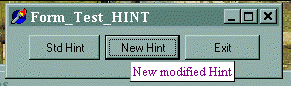
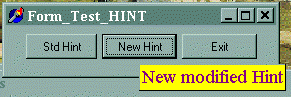
This is how my test application looks like:
 | pressing the first button 'Std_hint' you restore the hint class to the default one |
| pressing the second button 'New_Hint' you enable the new defined hint class. |
| Exit simply end the test application |
Standard Hint |
New Hint component |
 |
 |
- You can also tried to modify the font tipe at run-time, yet this require some extrawork
- We must provide a method we can use at runtime to change the font setup for this class
as show belowe.
|
if fontdialog1.execute then
TARLATIHintWindow.setFont(
fontdialog1.font );
HintWindowClass := TARLATIHintWindow; |
- This method must be a class method because it will be called by the class itself , the
instantiation of this class will be managed directly by the operating system.
- This means we should have a global variable inside the class ( the
equivalent of static variable in C ) and a class method to setup it's
value.
-
|
var
ffont: TFont; // FFont is
the global variable for the class
implementation
/ / SetFont is the class procedure used to update FFont
class procedure TARLATIHintWindow.SetFont( _font: TFont );
begin
FFont := _font;
end; |
The whole unit implementation show belowe would better show this point
|
|
Go to index |
|





