Low Bandwidth (Cheap) Rectangles
You can make flat colored rectangles and lines without having SiteSpinner create image files for them. Because the method shown below generates pure HTML which uses less bandwidth, your published page should load faster and more cleanly. The bigger the rectangle, the greater the savings you make.
Here's how:
- Create an empty 'code' or 'text' object by pressing the Code or Text button on the left-hand toolbar
- Press 'Save and Close'. This leaves an empty rectangle on your page
- With the Quick Editor shading tab, add a flat shading of whatever color you like
- Resize to whatever size you want. You can even resize to just a horizontal or vertical line
- Optional: add a border of whatever color you want (Quick Editor Outline tab)
If the optional border is greater than 1 pixel wide, you may see slightly different rectangles on different browsers -- some put the border inside the rectangle and some put it outside.
The shading must be flat and not any kind of gradient fill. If you want a gradient fill, you will still need some kind of image file -- e.g. generated by a 'Rectangle' object.
Use these cheap rectangles anywhere you would make a simple colored rectangle. Put them behind text objects. By making the rectangle considerably larger than the text, you can have a much wider colored border than you would get with a text object alone.
Bruceee's Sandpit
Web Design with SiteSpinner
Basic text object with a yellow background. There is some difficulty in getting a decent left hand margin.
Here is a no-color text object placed on top of a cheap rectangle. By adjusting the size of the rectangle, and the text position, you can have whatever width margins you want.
Horizontal 2-pixel high line
2-pixel wide lines butted together
A Trap Waiting for You
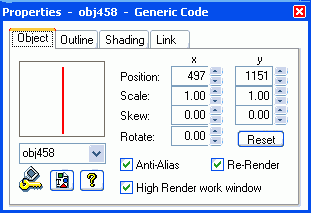
If you are using lines like these, try to keep the scaling as reported by the Object Editor or Quick Editor close to 1.0. Do this either in the
- Quick Editor Object tab; or
- Object Editor Transformations tab.
If you resize the lines by dragging, this can alter the scaling. If you have scaling too far removed from 1.0, you will meet some strange problems eg:
- lines that want to to change their height
- lines that you can't deselect
If you experience either of these problems, set the scaling back to 1.0 and adjust the width or height of your line in either the
- Object Editor Outline tab; or
- Geometry Editor Outline tab
Try to keep these values close to 1.00
Using the HTML <HR> Tag
It is possible to use the html <hr> tag to place a horizontal line across your page. I have done it here at the bottom of each page on this site. This is the code I place on my SiteSpinner workpages as a code object:
Links Not Possible
You cannot make links from empty code or text objects. If you place some text in one of these boxes, you will find the link will work only when you hover over the actual text. This is not satisfactory if you want to link from any part of the rectangle. If you want a link in a case like this, you will need to use a rectangle object.
Mouseovers are Possible
Mouseovers work with these rectangles, just as they do for any other object.
Groups are Possible
You can include these rectangles in groups, just as you would any other object.
Rectangle Objects
Recent versions of SiteSpinner allow you to use rectangle objects in the same way. When you make such a rectangle, be sure to set re-render off in the Geometry Editor.
There is however a limitation: if the height or width of such a rectangle is 4 or less pixels, the rectangle is rendered as an image. If this is an issue, consider using a code object instead.
Horizontal lines
Where you want to make thin horizontal lines with text objects, SiteSpinner (as at V2.50f) takes on a mind of its own:
- It often tries increase the height and reduce the width of code objects which you save and later reload.
- It publishes thin text lines as fat text lines
If you persist and use code objects, you can do it as I have done above, but I usually find I have to resize the code objects after reloading the project and before publishing. You may decide that using a rectangle object is a better option in this case.