
[Home]
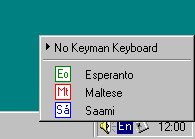
Launch Keyman and left-click its
 icon on the Windows taskbar to select Maltese:
| Vowels | ||||||||||||||
| 'a | 'e | 'i | 'o | 'u | 'y | -> | á | é | í | ó | ú | ý | ||
| "a | "e | "i | "o | "u | "y | -> | ä | ë | ï | ö | ü | ÿ | ||
| `a | `e | `i | `o | `u | -> | à | è | ì | ò | ù | ||||
| ^a | ^e | ^i | ^o | ^u | -> | â | ê | î | ô | û | ||||
| Consonants | ||||||||||||||
| 'c | 'g | 'h | 'z | -> | ċ | ġ | ħ | ż | ||||||
Here is an image of the consonants in case your browser does not support Unicode:

Press an accent key twice to output the accent itself.
You should either set your Windows keyboard to English while using Keyman or learn which keys you should press for the accents.
| Contents | Up |
This keyboard is used with Keyman 5 or later.
Although you cannot use this keyboard with Netscape Composer, Outlook Express or other Unicode-compliant applications under Windows 95/98/ME, you can copy Maltese Unicode text from Word or WordPad and paste it into them.
| Contents | Up |
I believe this package to be safe but it is entirely your risk to download and use it. You can freely use and distribute it provided that you also pass along its documentation.
| Contents | Up |
Double-click maltese.kmx after you have installed Keyman.
| Contents | Up |
| © Gyula Zsigri | [Home] | June 28, 2001 |
