Case Study
Pizza Order
A pizza Order application that allows the user to generate an order. The application should allow the user to select the size of the pizza (regular, large) and the toppings for the pizza(Pepperoni, mushrooms, onions, hot peppers). The application should display an order number that is automatically incremented after the previous order in printed, calculate the total of the order as the options are being selected or deselected, print the order and clear the form for a new order after printing. At start-up the order form should display a default size of regular and no toppings selected.
When designing the form for this case study we need to consider how the user should select the size and the toppings. Therefore, options buttons should be used to select the size (only one can be selected at a time), and check boxes should be used to select the toppings(more than one can be selected at a time)
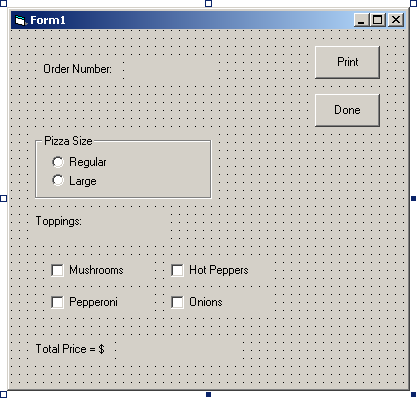
The drawing of the order form is here. Note that the order number label is sketched with dashed lines to indicate that its Caption will not appear until run time. The order number will be initialized to 1 in the Form_Load procedure and then incremented each time an order is printed. The price label will also appear at run time.
The program code design for this case study is best done by listing the pseudocade for event procedures:
Private Sub Form_Load()
Select Regular option button
Clear other option button and all check boxes
Change price label caption to regular pizza price
Initialize order number to 1 and display in order number label
End Sub
Private Sub Print_Click()
Print the form
Display message box to inform user that order has been printed and the form is being cleared for the next order
Select Regular option button and clear the rest of the form
Change price label caption to pizza price
Increment the order number and change order number label
End Sub
Private Sub cmdDone_Click()
Unload form
End Sub
The option button and check box click event procedures will update two global variables in order to determine the total price of the pizza at anytime. The dblPizzaPrice global variable will be assigned the value of either the price of a regular pizza or the price of a large pizza. The dblToppingsPrice global variable will be used to maintain the toppings price. When a toppings check box is selected or deselected this variable will be added to or subtracted from. The pseudo code for an option button and check box click event procedure are:
Private Sub optLarge_Click()
PizzaPrice = LargePizzaPrice
Display PizzaPrice + ToppingsPrice Caption
End Sub
Private Sub chkMushrooms_Click()
If chkMushrooms.Value = vbchecked Then
ToppingsPrice = ToppingsPrice + MushroomPrice
Else
ToppingsPrice = ToppingsPrice – MushroomPrice
End If
Display PizzaPrice + ToppingsPrice in TotalPrice Caption
End Sub
There are going to be five labels, one frame, two option buttons, four check buttons and two commands. The names and caption:
Pizza Order lblOrder
Order Number: lblOrderNumber
Toppings lblToppings
Total Price = $ lblTotal
Empty lblTotalPrice
Pizza Size frmPizzaSize
Regular optRegular
Large optLarge
Mushrooms chkMushrooms
Hot Peppers chkHotPeppers
Pepperoni chkPepperoni
Onions chkOnions
Print cmdPrint
Done cmdDone
You’ll notice that I didn’t give you the proper coding for this exercise, I didn’t think it necessary. If you have any problems though you can email me and I’ll give you the www to the page that the code is on.