Case Study
BlackJack
The Game of 21 application deals three cards to the user(player) and three cards to the computer. The cards dealt are randomly selected and are in the range of 1-10, inclusive. The winner is displayed in a message (You won!, Computer won! Or It’s a draw!) and a score is updated and displayed (1 point for each win). The user had the option of repeatedly playing the game and the scores are maintained until the user quits the application.
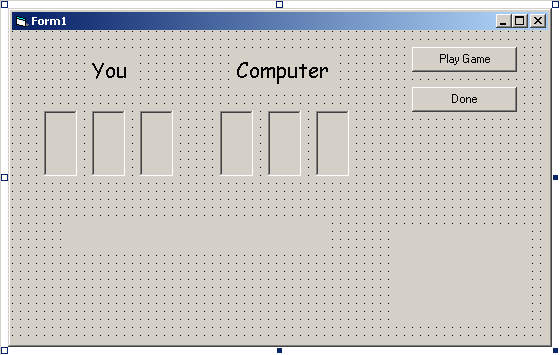
The design is here. Note that the two labels are sketched with dotted lines to indicate that their captions will not appear until run time. In this case, one label displays the winner of the hand dealt and the other label displays the scores. When the application first starts, the back of the cards are shown. Clicking on Play Game ‘deals’ a hand of cards to both player and computer.
The program code design for this case study is best done by listing the pseudo code for even procedures:
Private Sub Form_Load()
Randomize
End Sub
Private Sub
Deal 3 cards to player
Deal 3 cards to computer
If winner = Player Then
UpdateScore(PlayerScore)
ShowScore
ElseIf Winner = Computer Then
UpdateScore(CompScore)
ShowScore
Else
UpdateScore(DrawScore)
ShowScore
End If
End Sub
Private Sub cmdDone_Click()
Unload Me
End Sub
The names and captions:
|
The coding for this case study will be done in two steps. In the first step, the cmdPlayFam_Click even procedure will be coded. Coding this main procedure will help clarify the coding of the general and function procedures. Global constant declaration, the Form_Load procedure and the cmdPlayGame_Click even procedures are:
Option Explicit
Private Const strPlayer As String = “Player”
Private Const strComputer As String = “Computer”
Private Const strDraw As String = “Draw”
Private Sub Form_Load()
Randomize
End
Sub
Private Sub cmdPlayGame_Click()
Static intPlayerScore As Integer, intCompScore As Integer
Static intDrawScore As Integer
Dim intPlayerTotal As Integer, intCompTotal As Integer
‘Deal 3 cards to Player
Call DealCard(imgPlayerCard1, intPlayerTotal)
Call DealCard(imgPlayerCard2, intPlayerTotal)
Call DealCard(imgPlayerCard3, intPlayerTotal)
‘Deal 3 cards to Computer
Call DealCard(imgCompCard1, intCompTotal)
Call DealCard(imgCompCard2, intCompTotal)
Call DealCard(imgCompCard3, intCompTotal)
If Winner(intPlayerTotal, intCompTotal) = strPlayer Then
lblWinner.Caption = “You won!”
Call UpdateScore(intPlayerScore)
Call ShowScore(lblScore, intPlayerScore, intCompScore, intDrawScore)
ElseIf Winner(intPlayerTotal, intCompTotal) = strComputer Then
lblWinner.Caption = “Computer won!”
Call UpdateScore(intComputerScore)
Call ShowScore(lblScore, intPlayerScore, intCompScore, intDrawScore)
Else
lblWinner.Caption = “It’s a draw!”
Call UpdateScore(intDrawScore)
Call ShowScore(lblScore, intPlayerScore, intCompScore, intDrawScore)
End If
End Sub
There are several details to note in the cmdPlayGame procedure above. First, Static variables are used for maintaining the number of wins and draws. These variables need to be Static so that their values are maintained after the procedure has finished executing. If they were not Static they would be re-declared and reinitialized to 0 by VB each time the Play Game button was clicked. Second, a DealCard procedure s used to change the card assigned to each image object. Third, a Winner function is used to determine the winner of the hand. Lastly, an UpdateScore procedure and a ShowScore procedure are used to update and display the current score after each hand of cards.
Sub DealCard(ByRef imgCard As Image, ByRef intPlayerTotal As Integer)
Dim intCardNum As Integer
IntCard Num = int(10 * Rnd + 1)
If intCardNum = 1 Then
ImgCard.Picture = LoadPicture(“Card1.wmf”)
ElseIf intCardNum = 2 Then
ImgCard.Picture = LoadPicture(“Card2.wmf”)
ElseIf intCardNum = 3 Then
ImgCard.Picture = LoadPicture(“Card3.wmf”)
ElseIf intCardNum = 4 Then
ImgCard.Picture = LoadPicture(“Card4.wmf”)
ElseIf intCardNum = 5 Then
ImgCard.Picture = LoadPicture(“Card5.wmf”)
ElseIf intCardNum = 6 Then
ImgCard.Picture = LoadPicture(“Card6.wmf”)
ElseIf intCardNum = 7 Then
ImgCard.Picture = LoadPicture(“Card7.wmf”)
ElseIf intCardNum = 8 Then
ImgCard.Picture = LoadPicture(“Card8.wmf”)
ElseIf intCardNum = 9 Then
ImgCard.Picture = LoadPicture(“Card9.wmf”)
ElseIf intCardNum = 10 Then
ImgCard.Picture = LoadPicture(“Card10.wmf”)
End If
intPlayerTotal = intPlayTotal + intCardNum
End
Sub
Function Winner(ByVal intPlayerTotal As Integer, ByVal intCompTotal As Integer) As String
Const IntLimit As Integer = 21
If (intPlayerTotal = intCompTotal) Or (intPlayer Total > intLimit And intCompTotal> intLimit) Then
Winner = strDraw
ElseIf (intCompTotal > intLimit) Or (intPlayerTotal > intCompTotal And intPlayer <= intLimit) Then
Winner = strPlayer
Else
Winner = strComputer
End If
End
Sub
Sub UpdateScore (ByRef intWinner As Integer)
Const intWinPoints As Integer = 1
intWinner = intWinner + int WinPoints
End
Sub
Sub ShowScore (ByRef lblLabel As Label, ByVal intPlayerScore As Integer, ByVal intCompScore As Integer, ByVal intDrawScore As Integer)
LblScore.Caption = “You:” & intPlayerScore & vbCrLf & “Computer:” & intCompScore & CrLf * “Draws:” & intDrawsScore
End
Sub
Private Sub cmdDone_Click()
Unload
End
Sub
By god that was a bitch to do, wasn’t it! I hated doing that one, it was so long. Anyway, that was the final case study. Go, leave, have fun, stop sitting the damn computer 24/7 and have a good summer!