  |
|
       |
|
|
External Hardware |
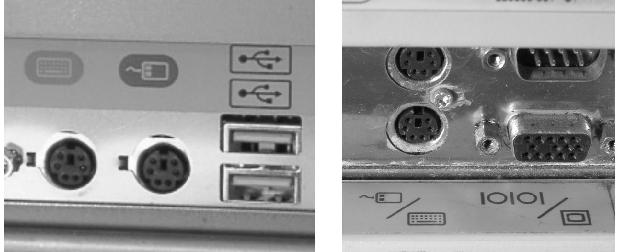
Plugging in the keyboard and mouse:There are two possibilities for plugging in the keyboard. The easiest is if you have an AT outlet. The newer type is PS2.
Installing PS2 outlet keyboards and mouseThere will almost always be a picture of a keyboard next to one outlet, and a mouse next to the other. If you make a mistake, and install the keyboard into the wrong slot your computer will not be damaged. When you turn your computer on, it will not work correctly.
If one outlet is on top of the other, the top outlet is usually for the mouse. If there is one outlet next to the other, the one on the left is usually for the keyboard. |