 |

|
|||||
|
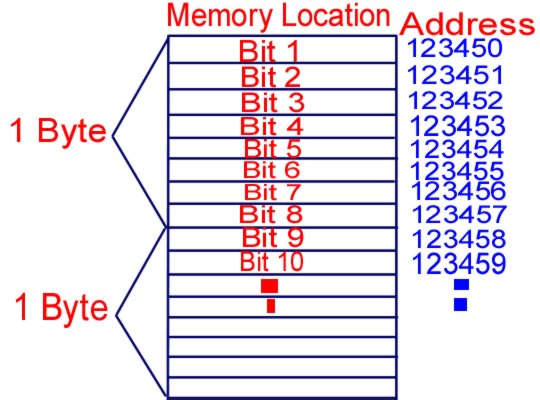
General Overview of the Compiling Process and Memory AllocationYou have installed your C++ compiler whether it be Borland or Turbo C++ and are wondering why we use programming languages such as C++, PERL, JAVA, etc and what specifically is supposed to happen when you type your programme. How Your Computer Stores Information Your computer's memory consists of many allocated compartments containing zero's and one's (0, 1) called binary digits (machine code) or bits (8 bits = 1 byte). These bits are organised consecutively and are given addresses for identification purposes, much like the houses and flats in your neighbourhood each have a unique address, in which no two addresses are the same. In these compartments called bits, information is stored. The information stored is basically what you input into your computer whether you type something, say something into a microphone, etc. You can think of your computer's memory as little blocks of information. See Figure 1.1 below: FIGURE 1.1 |
|||||
|
FUNDAMENTALS:
|
||||||
|
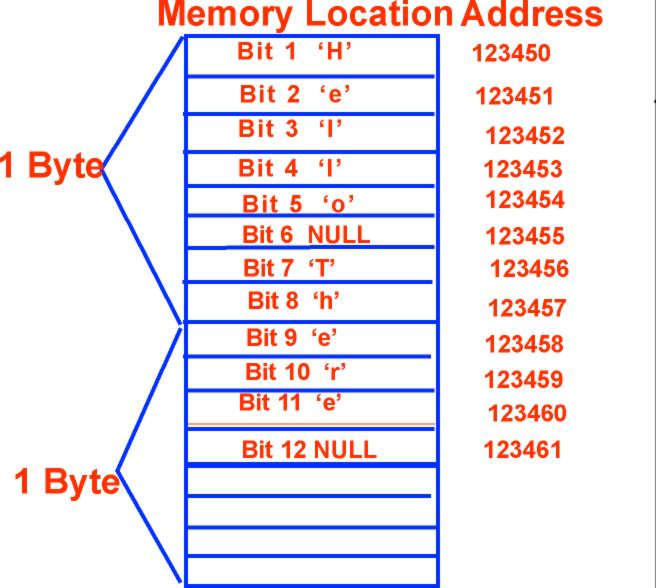
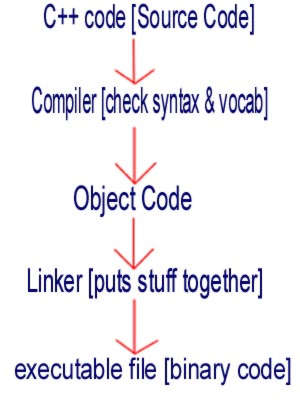
How does your computer hold the information? Suppose you type in a sentence such as "hello there". Your computer will divide up the word "hello" into 5 separate bits (compartments), one for each letter terminating in a NULL character (The NULL character tells the compiler it has reached the end of the string of characters, integers, floats, etc). There will also be a separate bit for the space between hello and there. "there" will be divided into 5 separate bits terminating in a NULL character as well as shown below: FIGURE 1.2 As I stated before, each bit (compartment) as a unique address. Sometimes, one bit is not enough to hold up the information you type into your computer. In this case, once one bit is filled, the leftover information is placed in bit number two. If bit number two is filled, the leftover information is placed in bit number 3, and so on. When this occurs all of the bits holding the information will have the same address. In this case, the 5 bits which make up the term "hello" will all have the same address because it is one group of information and one bit is not enough to hold the 5 letters. High vs Low Level Languages A low level language is the language your computer can understand, examples include assembly language and machine code. High level languages are closer to spoken English, examples include C++, SQL, JAVA, Pascal, etc which consist of vocabulary, semantecs (meanings), and syntax. The CPU of your computer can only understand binary code, which is why when you compile your program, the code must be converted to 0's and 1's. Compiling Process Imagine that you installed your C++ compiler, copied code from a C++ textbook, pressed the compile button, and your programme ran exactly as the book stated. What exactly happened in those few seconds before your output was printed exactly as stated in your textbook? As I stated before, C++ is a high level language, and your computer cannot understand high level languages, as it only understands a low level language called machine code (0's and 1's). When you click on the compile button the high level language you are using (in this case C++) is converted to code your computer can understand (machine language) in order for your programe to run (see Figure 1.3 below). This will be explained in detail below. The code you type into your programme is called Source Code. Your computer cannot understand this source code. When you compile your programme, the compiler checks the syntax and vocabulary in your C++ code and produces Object Code. Object code contains information embedded in it however it is not yet executable. The Object code is then linked together by a linker and executable file containing machine language (0's and 1's which your computer can understand) is produced. FIGURE
1.3
|
||||||
|
|
||||||
|
Site Credits| Questions and Enquiries
| © 2001 | Contact
|