|
Home









|

How Technology Has Impacted My Role As A Teacher :
For 22 years now I have worked within the Social Services field supporting people with disabilities. My first job was at Severn pre-school back in the days of the segregated classroom. Over the years I worked in both residential and vocational settings and eventually entered into management. In British Columbia I went through extensive training specifically in the area of communication systems for persons with disabilities and I have seen a huge amount of progress in the technology that is now available.
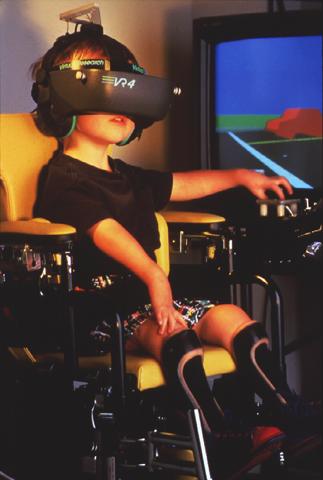
Assistive Technology Products can enable people with disabilities to accomplish daily living tasks, assist them in communication, education, work or recreation activities, in essence, help them achieve greater independence and enhance their quality of life. They can help improve physical or mental functioning, overcome a disorder or impairment, help prevent the worsening of a condition, strengthen a physical or mental weakness, help improve a person's capacity to learn, or even replace a missing limb.
Adaptive Technology has the ability to level the playing field for persons with disabilities and give them opportunities that they would not normally have. The website Special Needs Computers displays a wide variety of products available to people with exceptionalities ranging from special computer mouses and keyboards right up to the ERICA Eye Gaze Computer System that allows the user to type messages and enter text into any program running on their computers using their eyes.
Technology also has great applications for children who do have exceptionalities. When we examine different learning styles and consider that there are children who are visual and tactile learners, simply using a computer may reach them verses the old standard lecture model that only appeals to the auditory learner.
For myself I will be one of those techno-savvy teachers who uses a lap top and projector on a regular basis. It is much more appealing to me to create slides using power point and incorporate websites with lots of visuals and short movies to help me in my teaching. I am also a big organization nut so creating websites and files will amke my life muchmore manageable. In addition to this, my handwriting is terrible as is my spelling so having the ability to do much of my work on computer has great appeal to me. And even the children themselves are so advanced in their use and understanding of technology that it makes tremendous sense to incorporate it regularly as students may be more interested in learning as a result.
Assistive or Adaptive Technology Definitions:
Assistive or Adaptive Technology
Assistive or Adaptive Technology commonly refers to "...products, devices or equipment, whether acquired commercially, modified or customized, that are used to maintain, increase or improve the functional capabilities of individuals with disabilities..." - Assistive Technology Act of 1998
Communication Aids
Products and equipment designed to help persons with speech disabilities or writing difficulties to communicate. At its very simplest, augmentative communication can be a page with picture choices or alphabet letters that a person points to. It can also involve highly sophisticated speaking computers with on-screen communication boards and auditory or visual scanning. Common sub-categories are:
Speech and Augmentative Communication Aids
Alternative and Augmentative Communication (AAC) involves alternate methods of communicating needs, feelings, ideas, and perceptions through the use of electronic and non-electronic devices that provide a means for expressive and receptive communication for persons with limited or no speech. Includes communication boards, speech synthesizers, text-to-speech software and hardware, head wands, light pointers, mouth sticks, signal systems, telephony equipment, etc.
Writing and Typing Aids
Includes tactile devices, Braille devices, note taking devices, spelling devices, word prediction/completion software, modified typewriters, portable typewriters, etc. Does not generally include products intended to facilitate computer access and usage (see Computer Access Aids).
Computer Access Aids
Hardware and software products that enables persons with disabilities to access, interact with, and use computers at home, work or school. Includes modified or alternate keyboards, switches activated by pressure, touch screens, special software, voice to text software, etc. Common sub-categories are:
Alternative Input Devices
Includes alternative and adaptive keyboards, expanded keyboards ,Keyguards, alternative and ergonomic mouse/pointing systems, head-operated pointing devices, Eyeglaze pointing devices, mouth/tongue pointing devices, Morse code input devices, brain-actuated pointing devices, switches, touch screens, voice input systems, speech-to-text software, voice recognition/voice command software, dictation software, on-screen keyboards, cursor enlargement software, ergonomic computer-based equipment, etc.
Alternative Output Devices
Computer-based output devices that generally enable Blind and Vision impaired persons to use or interact with a computer. Includes Braille display/output devices, Braille embosser/printers, screen reading software, screen magnification/enlargement software, large print monitor, etc.
Accessible Software
Includes software applications adapted for children and adults with disabilities, operating system accessibility options, accessible web browsers, etc.
Universal Design
Design methods, techniques and guidelines for making computers and their applications fully accessible to people with disabilities.
Conclusion:
Technology is a reality in today’s world and teachers who are not utilizing it are missing on great teaching opportunities. If we want to reach this generation we need to do so by speaking their language and their language involves technology…
Scott Towaij 4797198
|