
~*~PAGE 3~*~

OK we will finish now and make it into a tube, ready?
Add a drop shadow
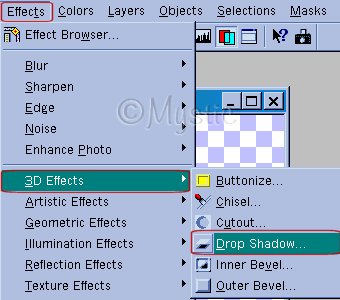
With the following settings, it's extremely important
that you adjust the BLUR and OPACITY to match your cutout and font!
EVERYTHING ELSE NEEDS TO BE LIKE THIS:

when you do this...deselect your text (control + D) and you should have something like what I have below

Now let's make it into to tube so we never have to do this tut again!

NOTE!!!!!
SOMETIMES you get an error like this one:

THIS IS BECAUSE you need to merge visible layers, or you need to PROMOTE TO LAYERS~~ and your colors need to be 16million colors (Increase color depth)...no biggie! This was for those who will just NOW
learn to make tubes, and will make tubes until your hearts content...keep that note handy!~~~
Ok back to the tut, use these settings:

Guess what? You're done!~ LOL...now let's find your tube and I'll giev you some secrets on how to add it
to your work :)
If you wish to learn more then please....
CONTINUE
If you do *NOT* then HAVE A NICE DAY!~~
THANKS for doing our tut!~
© 2000-2001.
By ~*~Mystic~*~, for DCS
No portion may be reproduced or removed without prior written consent.
Please respect our work as we respect yours!
|
|

