
~*~PAGE 2~*~

Continue by clicking on your layers
 tool and adding a new layer tool and adding a new layer
(click on the little pages thingy),

Now MAKE SURE~ the ants are STILL crawling around your Brand!!
OK let's delete the bottom layer, we dont' need it anymore!
Highlight the layer1, and click on the little garbage can to delete it. :)
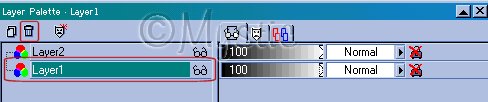
Okies!~ Now we're ready for the fun!~ Let's add the cutout,
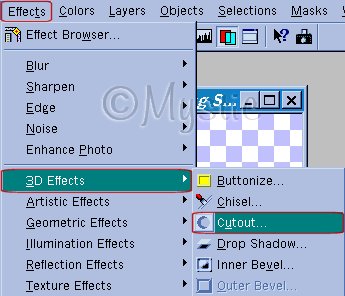
With similar settings like these:
(NOW PLEASE DO ADJUST THE BLUR if you need to...if you have chosen a
thicker font than mine try using a blur of 3 0r 4 , or whatever looks right to you)

And you should have something like this:
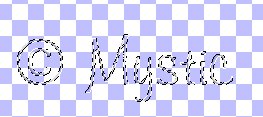
If you do have this then please....
CONTINUE
If you do *NOT* try looking over this page again and if you are stuck email me.
© 2000-2001.
By ~*~Mystic~*~, for DCS
No portion may be reproduced or removed without prior written consent.
Please respect our work as we respect yours!
|
|

