| Hi and welcome to the "how to build a computer" section in this section we will expain in steps how to build a computer from bits to a full working computer.
Now some people just dont like the thing about building them, but all in all they are easy if you have the right tools and of course the hardware
|
Required Items
These are the following items you need to build a computer.
- Flat head screw driver
- Crosshead Screw driver.
- Thermal paste ( for use on the processor when attaching the heatsink )
Hardware needed
The following hardware you need in building a computer are:-
- ATX case ( normally cost between £25 to £100
- Motherboard ( there are loads of different types of mobos it doesnt matter which one you chose as this isnt a important worry)
- CPU/Proccessor ( proccessors costs can vary from £30(amd) upto £300(intel), AMD is much cheaper than intel )
- Memory ( there are two types of memory known as SDRAM (100,133) and DDR ( 2100, 2700, 3300, 400) DDR is much faster than sdram as 133 is much slower than 2700.
- Video card ( Cost between £9 upto £400). The more you spend the better the video card, The current best cards out at the moment are the ATI Raedon series ( which cost £63,£125 and £300) for each diffent model.
- Other Items. You can also buy soundcards, network cards, usb cards and many other pci cards for your pc but there is no point in worrying about this yet until you really want the items.
After you have got all the above Equipment you are ready to rock and roll and get to the job in hand. This guide will be put into steps to make it easier for you to understand.
1 - Remove both sides of you ATX case (this will give you more room). After you have done this you should have a bag in you case that contains screws and small posts.
2 - Use the brass posts to go onto the case (small places for them to go into). Use as many brass posts as you board has holes. (Normally Six or nine)
3 - Once you have your motherboard lined up with you brass posts on you ATX case, you have to screw the board down. (You will be given screws for the board). Screw all the screws into place and make sure the back of the case lines up with the blanking plate.
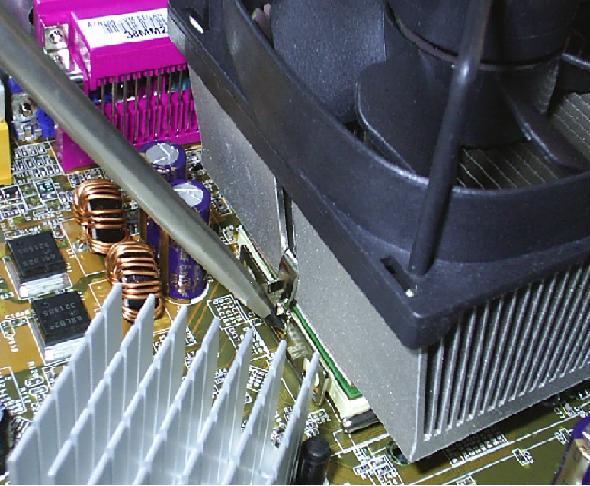
4 - Now you are ready to put the the Processor (The hardest bit on AMD, The easiest bit on Intel) to do this on AMD get you heatsink and put it on top of you processor. Now you need to clip it on, on you motherboard. Get a flatbladed screw driver and force the middle clip down. Once you have done that you are ready to carry on.
IMPORTANT
Use thermal paste if possible.
 5 - Memory, Memory is a easy job, All you have to do is plug it into either the DDR slot or the SDRAM slot. Once you hear and click you are done with memory.
5 - This part of the guide can be skipped if you using onboard sound, video, or ethernet. If not read on.
6 - When inserting (AGP, PCI or ISA) cards. Make sure that the golden part of the card is in place and safetly in (All golden lines on bottom of cards should not be seen)
7 - Video Card (AGP). Most video card use the AGP slot these days, all you have to do here is plug the card in and you should hear a click (The card is in). Now just screw the card screw in at the top and you are done with Video. (If you are using ATI raedeon 9800/Pro plug power into the card)
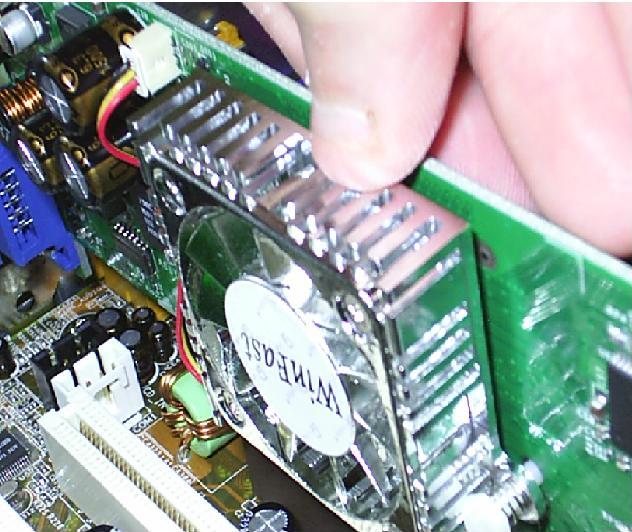 8 - Sound And Ethernet. When doing sound and ethernet plug the cards in like in video til you hear a click and they are successfully in.
9 - IDE harddisks and CDROM drives. Cant do much without harddisks these days so all you have to do in plug the IDE cables onto the motherboard (making sure Red is going towards the Power supply, PSU ). and plug power into the drives ( if you need more help on this topic then come to the forums where we will expain it into more detail)
10 - Job Done.. All you have to do now is plug you headers on (See your manual you where supplied with you motherboard). And if you machine beeps once it is all working if not, you got some work to do to find out what is wrong with your machine.

|

