Contents
Ad
Hoc versus Infrastructure Modes
Wireless
LAN Radio Frequency Methods
Authentication
and Association
Standard
802.11-based wireless LANs (WLANs) provide mobility to network users while
maintaining the requisite connectivity to corporate resources. As laptops become
more pervasive in the workplace, users are more prone to use laptops as their
primary computing device, allowing greater portability in meetings and
conferences and during
Business
travel. WLANs offer organizations greater productivity per employee by providing
constant connectivity to traditional networks.
Wireless network connectivity is not limited
to enterprise use. WLANs offer increased productivity not only before and after
meetings, but also outside the traditional office environment. Numerous wireless
Internet service providers (WISPs) are appearing in airports, coffee shops,
hotels, and conference and convention centers, enabling enterprise users to
connect in public access venues. Wireless Local
Area Networks (WLANs) promise high mobility, increased convenience, and don't
require any expensive cabling infrastructure.
Types
of Wireless Technology
Wireless
local-area networking has existed for many years, providing connectivity to
wired infrastructures where mobility was a requirement to specific working
environments. These early networks were based on both
frequency-hopping
and direct-sequencing radio technologies. These early wireless networks were
nonstandard implementations, with speeds ranging between 1 and 2 MB. Without any
standards driving WLAN technologies, the early implementations of WLAN were
relegated to vendor-specific implementation, with no provision for
interoperability, inhibiting the growth of standards-based WLAN technologies.
Today, several standards exist for WLAN applications: 802.11, HiperLAN, HomeRF
SWAP, and Bluetooth.
Functional
View
From
a functional viewpoint, WLANs can be categorized as follows:
peer-to-peer
wireless LANs, multiple-cell wireless LANs, and building-to-building wireless
networks (point to point and point to multipoint). In a peer-to-peer
Wireless
LAN, wireless clients equipped with wireless network interface cards (NICs)
communicate with each other
without
the use of an access point. Coverage area is limited in a peer-to-peer LAN, and
wireless clients do not have access to wired resources. A multiple-cell wireless
LAN extends the coverage through the use of overlapping cells.
Coverage
area of a cell is determined by the characteristics of the access point (a
wireless bridge) that coordinates the wireless clients’ use of wired
resources.
Building-to-building
wireless networks address the connectivity requirement between LANs (buildings)
in a campus-area network. There are two different types of building-to-building
wireless networks: point to point and
point
to multipoint. Point-to-point wireless links between buildings are radio- or
laser-based point-to-point links.
A
radio-based point-to-point bridged link between buildings uses directional
antennas to focus the signal power in a narrow beam, maximizing the transmission
distance. A laser-based point-to-point bridged link between buildings uses laser
light (usually infrared light) as a carrier for data transmission.
A
radio-based point-to-multipoint bridged network uses antennas with wide beam
width to connect multiple buildings (LANs) in a campus-area network.
Ad
Hoc versus Infrastructure Modes
Most
WLANs deployed by organizations operate in a mode called “infrastructure.”
In this mode, all wireless clients connect through an access point for all
communications. You can, however, deploy WLAN technology in a way that forms an
independent peer-to-peer network, which is more commonly called an ad hoc WLAN.
In
an ad hoc WLAN, laptop or desktop computers that are equipped with compatible
WLAN adapters and are within range of one another can share files directly,
without the use of an access point. The range varies, depending on the type of
WLAN system.
Laptop
and desktop computers equipped with 802.11b or 802.11a WLAN cards can create ad
hoc networks if they are within at least 500 feet of one another.
The
security impact of ad hoc WLANs is significant. Many wireless cards, including
some shipped as a default item by PC manufacturers, support ad hoc mode. When
adapters use ad hoc mode, any hacker with an adapter configured for ad hoc mode
and using the same settings as the other adapters may gain unauthorized access
to clients.
802.11
Wireless Technology
The
IEEE maintains the 802.11-based standard, as well as other 802-based networking
standards, such as 802.3 Ethernet.
Standard
802.11-based wireless technologies take advantage of the radio spectrum deemed
usable by the public. This spectrum is known as the Industrial, Scientific, and
Medical (ISM) band. The 802.11 standard specifically takes advantage of two of
the three frequency bands, the 2.4 GHz-to-2.4835 GHz UHF band used for 802.11
and 802.11b networks, and the 5.15 GHz-to-5.825 GHz SHF band used for
802.11a-based networks.
The
spectrum is classed as unlicensed, meaning there is no one owner of the
spectrum, and anyone can use it as long as that user’s device complies with
FCC regulations. Some of the areas the FCC governs include the maximum
Transmit
power of the radios and the type of encoding and frequency modulations that can
be used.
Wireless
LAN Radio Frequency Methods
802.11b signals function in the 2.4000 GHz
to 2.4835 GHz range, and have a maximum theoretical throughput of 11Mbps
802.11b uses only Direct Sequence Spread
Spectrum (DSSS) radio signaling, as opposed to Frequency Hopping Spread Spectrum
(FHSS), which was part of the original 802.11 specifications. DSSS allows for
greater throughput, but is more susceptible to radio signal interference
The
2.4-GHz ISM band (used by 802.11b) makes use of spread-spectrum technology.
Spread spectrum dictates that data transmissions are spread across numerous
frequencies. The reason for this is that the 2.4-GHz band has other primary
owners. Primary owners are entities who have bought the spectrum for their own
use, or have been granted legal access to the spectrum above all else. Common
primary owners of the 2.4-GHz band include microwave oven manufacturers.
Microwave ovens transmit in the same frequency range, but at far greater power
levels
802.11
network cards operate at 100 mW, whereas a microwave oven operates at 600W).
With spread-spectrum technology, if there is ever any overlap with the primary
owner, the primary owner has what can effectively be called“radio frequency (RF)
right of way.”
The
802.11 standard specifies two different types of Layer 1 physical interfaces for
radio-based devices. One uses a frequency-hopping architecture, whereas the
other uses a more straightforward single-frequency approach, known as direct
sequencing.
Frequency
Hopping
The
2.4-GHz ISM band provides for 83.5 MHz of available frequency spectrum. The
frequency-hopping architecture makes use of the available frequency range by
creating hopping patterns to transmit on one of 79 1-MHz-wide frequencies for no
more than 0.4 seconds at a time. This setup allows for an interference-tolerant
network. If any one channel stumbles across an interference, it would be for
only a small time slice because the
frequency-hopping
radio quickly hops through the band and retransmits data on another frequency.
The
major drawback to frequency hopping is that the maximum data rate achievable is
2 Mbps. Although you can place frequency-hopping access points on 79 different
hop sets, mitigating the possibility for interference and
Allowing
greater aggregated throughput, scalability of frequency-hopping technologies
becomes a deployment issue.
Work
is being done on wide-band frequency hopping, but this concept is not currently
standardized with the IEEE.
Wide-band
frequency hopping promises data rates as high as 10 Mbps.
802.11a
Networks
In
1999, the IEEE also ratified another Layer 1 physical interface, known as
802.11a. The 802.11a standard uses the 5-GHz SHF band to achieve data rates as
high as 54 Mbps.
Unlike
the 802.11 and 802.11b standards, the 802.11a standard uses a type of
frequency-division multiplexing (FDM) called orthogonal FDM (OFDM). In a FDM
system, the available bandwidth is divided into multiple data
carriers.
The data to be transmitted is then divided among these subcarriers. Because each
carrier is treated independent of the others, a frequency guard band must be
placed around it. This guard band lowers the bandwidth efficiency. In OFDM,
multiple carriers (or tones) are used to divide the data across the available
spectrum, similar to FDM. However, in an OFDM system, each tone is considered to
be orthogonal (independent or unrelated) to the adjacent tones and, therefore,
does not require a guard band. Thus, OFDM provides high spectral efficiency
compared with FDM, along with resiliency to radio frequency interference and
lower multipath distortion.
The
FCC has broken the 5-GHz spectrum into three parts, as part of the Unlicensed
National Information
Infrastructure
(U-NII). Each of the three U-NII bands has 100 MHz of bandwidth and consists of
four nonoverlapping channels that are 20 MHz wide. As a result, each of the
20-MHz channels comprises 52 300 kHz-wide subchannels. Forty-eight of these
subchannels are used for data transmission, while the remaining four are used
for error correction. Three U-NII bands are available for use:
•
U-NII 1 devices operate in the 5.15- to 5.25-GHz frequency range. U-NII 1
devices have a maximum transmit power of 50 mW, a maximum antenna gain of 6 dBi,
and the antenna and radio are required to be one complete
unit
(no removable antennas). U-NII 1 devices can be used only indoors.
•
U-NII 2 devices operate in the 5.25- to 5.35-GHz frequency range. U-NII 2
devices have a maximum transmit power of 250 mW and maximum antenna gain of 6
dBi. Unlike U-NII 1 devices, U-NII 2 devices may operate
indoors
or outdoors, and can have removable antennas. The FCC allows a single device to
cover both U-NII 1 and U-NII 2 spectra, but mandates that if used in this
manner, the device must comply with U-NII 1 regulations.
•
U-NII 3 devices operate in the 5.725- to 5.825-GHz frequency range. These
devices have a maximum transmit power of 1W and allow for removable antennas.
Unlike U-NII 1 and U-NII 2 devices, U-NII 3 devices can operate only in outdoor
environments. As such, the FCC allows up to a 23-dBi gain antenna for
point-to-point installations, and a 6-dBi gain antenna for point-to-multipoint
installations.
Wireless
LAN Components
Components
of a WLAN are access points, NICs or client adapters, bridges, and antennas.
•
Access point—An access point operates within a specific frequency
spectrum and uses a 802.11 standard specified modulation technique. It also
informs the wireless clients of its availability and authenticates and
associates
wireless clients to the wireless network. An access point also coordinates the
wireless clients’ use of wired resources.
•
NIC or client adapter—A PC or workstation uses a wireless NIC to
connect to the wireless network. The NIC scans the available frequency spectrum
for connectivity and associates it to an access point or another wireless
client. The NIC is coupled to the PC or workstation OS using a software driver.
•
Bridge—Wireless bridges are used to connect multiple LANs (both wired
and wireless) at the Media Access Control (MAC) layer level. Used in
building-to-building wireless connections, wireless bridges can cover longer
distances
than access points (IEEE 802.11 standard specifies 1 mile as the maximum
coverage range for an access point).
•
Antenna—An antenna radiates the modulated signal through the air so
that wireless clients can receive it. Characteristics of an antenna are defined
by propagation pattern (directional versus omnidirectional), gain, transmit
power, and so on. Antennas are needed on both the access point and bridge and
the clients.
Security
issues
Authentication
and Association
The 802.11 standard defines a multi-step method of establishing network
connectivity between clients and access points. This process uses a series of
broadcast and directed commands that enable the wireless endpoints to identify,
authenticate and associate with each other. The process of connecting a wireless
client to a network is initiated when the client broadcasts probes on all radio
frequency channels used by 802.11b. The probes contain the client MAC address
and the ESSID. Any AP in range will respond with its own ESSID, channel, and MAC
address. Using this information, the client can limit its signal to the AP's
channel and begin the process of authentication.
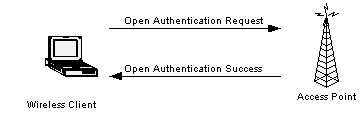
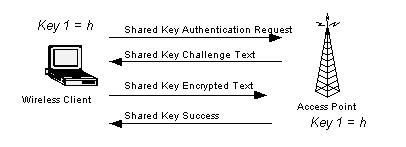
802.11 provides two methods of authentication: open system or
shared key. An open system allows any client to authenticate as long as it
conforms to any MAC address filter policies that may have been set. All
authentication packets are transmitted without encryption. Shared key
authentication, on the other hand, requires WEP be enabled, and identical WEP
keys on the client and AP
The initiating endpoint requests a shared key authentication,
which returns unencrypted challenge text (128 bytes of randomly generated text)
from the other endpoint. The initiator encrypts the text and returns the data.
The second endpoint verifies the data integrity and validity, then
authenticates the connection and informs the client. This process occurs to
establish that both endpoints' keys match. Keep in mind that the authentication
method must be identically pre-defined on each endpoint of the transmission.
|
|
|
|
|
Open
Authentication |
|
|
|
|
|
Shared
Key Authentication |
After authentication is complete, the client then initiates
the association process. The client transmits its ESSID, which is verified by
the AP. With a positive match, the AP adds the client to its table of
authenticated clients and returns an affirmation to the client. At this point,
the client is now connected to the network.
Encryption
WEP is an optional encryption standard. According to the protocol, WEP generally
uses a 64-bit RC4 stream cipher. RC4 is a symmetric encryption algorithm,
meaning the same key is used to both encrypt and decrypt the data payload. This
encryption key is generated from a seed value created by combining a 40-bit user
defined WEP key with a 24-bit Initialization Vector (IV). The WEP key generally
takes the form of a 10-character hexadecimal string (0-9,A-F) or a 5-character
ASCII string, which must be present on both ends of the wireless transmission.
The protocol allows for up to four concurrently defined WEP keys.
The standard does not, however, currently define how the IV is
established, so the implementation varies by vendor. When an encrypted wireless
client starts transmitting data, the IV can start with a value of zero or
another randomly defined starting value, and generally increments upwards in a
predictable manner, with each successive frame. However, some vendors (such as
Cisco) use a more sophisticated, random determination of the IV.
WEP encryption is performed at Layer 2 above the MAC sublayer,
which means that only the data payload and header information from higher in the
protocol stack are encrypted. The cipher text is formed from the IV+WEP key
combination, the plaintext and the checksum. A series of WEP-related headers are
then appended to the frame, including the IV value and which WEP key was used.
Then other MAC sublayer information including destination and source addresses,
in addition to the BSSID, are appended as well. All MAC related information in
the header is transmitted unencrypted. The frame is then sent out, at which
point the receiver takes the IV, appends it to the defined key (assuming it
matches) and decrypts the payload using the generated keystream.
As the name indicates, WEP was never intended to be a panacea
for wireless security. Instead, it was designed to afford security equivalent to
that provided by an unencrypted wired network. Unlike a wired network, to which
physical access is limited by access to the building that houses it, wireless
networks are potentially accessible to anyone within range with a compatible
receiver. An intruder can sit in your parking lot and capture enough data to run
AirSnort, crack your encryption keys, and steal your data. With this in mind,
there is now significant doubt whether WEP accomplishes the goal to provide
security equivalent to an unencrypted wired network
ESSIDs
The first security mechanism is the Extended Service Set ID (ESSID), which is an
alphanumeric code that is entered into the all APs and wireless clients that
participate on the same wireless network. You can think of ESSID's as being
similar to a workgroup name on a Microsoft network. Every vendor solution
provides a default value for the ESSID. Cisco uses tsunami, 3COM uses
101, and Agere uses WaveLAN network. Changing the ESSID from its default
value is a good first step toward heightened security, but savvy administrators
will take additional steps.
Many enterprise-class APs allow you to disable the broadcast
of the ESSID. The AP will periodically broadcast the network name by default,
allowing some vendors' wireless client software to provide remote wireless
clients with a list of all available wireless networks. By disabling this
broadcast, users either have to know the network name or have some kind of
wireless packet capture software to derive this information. there is no
significant reason to broadcast the ESSID, unless you want outsiders to know
about your network.
Access
Lists
The next layer of wireless security is the Access List. The access list is how
you define the MAC addresses of the wireless NICs you will allow to associate
with your access point. An access list also creates management overhead, as you
need to enter the MAC address of each card that needs access. If you want to
update access lists, you'll have to do it manually, unless you use a tool
provided by some vendors (e.g., Lucent, Cisco), which help automate the process.
Unfortunately, MAC addresses are easy to discover with a sniffer since they are
transmitted in clear text. By configuring a wireless NIC with a known good MAC
address that was sniffed out of the air, an attacker can gain access to the
network.
Authentication
There are limited authentication options in the current standard. Client
hardware-based authentication can be open, or based on a shared key between the
AP and client. In the short term, shared-key authentication will provide
rudimentary authentication services, but a more robust solution is pending the
full adoption of the 802.1x standard proposal
If you need user-based authentication, you'll need to use a
RADIUS (Remote Authentication Dial-in User Service) server. RADIUS has the
advantage of being centrally managed, which is important for larger deployments.
Another advantage is that RADIUS can be used to authenticate VPN clients as well
as wireless clients, so you're allowing multiple services to be authenticated
from a single, centralized database, easing administrative overhead.
WEP
Once a computer is granted access to the network, it's important to encrypt the
data since data transmitted in the clear can be sniffed out. 802.11b provides an
encryption mechanism known as WEP, or Wired-Equivalent Privacy. WEP uses either
a 64-bit or a 128-bit encryption key and is generally disabled by default on APs.
Not using WEP makes it simpler to set up the network, but also means that
analyzers can sniff network traffic and potentially access corporate data.
The difficulty with WEP lies with key management. Without some
sort of centralized way of managing and distributing keys seamlessly to both APs
and clients, a change in any of the keys creates an administrative nightmare.
Administrators will need to change the keys on all APs and clients in order to
secure the environment properly. As is stands, administrators should change keys
periodically on all wireless components.
Mutual
Authentication
Extensible
Authentication Protocol
-
Transport Layer Security (EAP-TLS) supports mutual authentication and
dynamic keying. Mutual authentication is comprised of two separate
Authentications.
The client authenticates the wireless access point and the wireless access point
authenticates the server. Mutual authentication stops man-in-the-middle attacks
.An attacker cannot fool the client into thinking that he is authenticated into
the access point because the client authenticates the access point. Mutual
authentication may not stop session high-jacking.
Using
VPNs
If you're concerned about the usage of WEP and its ability to provide adequate
security for your network, there are other things that can be done to improve
your security. It may be useful to think of securing the wireless LAN as you
would protect the internal LAN from the public Internet. Using this framework,
you could install two firewalls: one at the gateway into your corporate LAN and
another between the LAN and the wireless network. The wireless firewall can be
configured to pass only VPN traffic. This allows a remote user to connect to the
corporate LAN using the VPN. Likewise, a wireless user can authenticate to the
wireless infrastructure while still having wireless data encrypted through the
VPN tunnel.
By segregating the wireless infrastructure from your wired network, and enabling VPN traffic to pass between them, you create a buffer zone that increases network security. In addition, IPSec, the main IP layer encryption protocol used in VPN technology, prevents productive traffic sniffing, which will thwart attacks that rely on using WEP for encryption, such as AirSnort. Another advantage of using the VPN approach is if you've already deployed a VPN, your remote users are already familiar with the limitations imposed by it. Getting wireless users to be comfortable with similar limitations should be relatively easy. Two of the key design parameters of VPN are the OSI network layer that is encrypted and the endpoints of the tunnel. Generally, the lower the layer that is encrypted the more secure. Also the longer the tunnel, generally the more secure the tunnel.
Conclusion
The
three major components of security are the technology, the policies, and the
people. They are all legs of a three-legged stool. In the way that a
three-legged stool is not stable without all three legs; a system will not be
secure without the right technology, policy, and people.
We
believe that a WLAN security architecture must have the following attributes:
mutual authentication; a strongly encrypted layer 2 tunnel;
and
strong cryptographic integrity verification. Without these features, not only is
a WLAN vulnerable, but the entire information infrastructure of which it is a
part is at risk. Mutual authentication requires that the client
authenticate
itself to the network the network also authenticate itself to the wireless
client. Man-in-the-middle, session high-jacking, and replay attacks are enabled
by only requiring the wireless client to authenticate itself to the network.
EAP-TLS
is the strongest authentication scheme that we analyzed and we highly recommend
it. 802.1x is vulnerable to a number of published attacks and because of its
loose coupling with the 802.11 wireless state machine appears to have a fatally
flawed design for wireless network implementations that will be difficult to
fix.
Combining
strong mutual authentication with a strongly encrypted layer 3 tunnel provides a
good level of protection and it might be adequate for
many
organizations. For those organizations that are more focused on the threats to
the wireless component of the infrastructure layer 2 tunnels
Provide
a better choice. By hiding the network layer header, attacks that manipulate the
IP address are much more difficult. Traffic analysis is also
Severely
hindered by this approach.