
|  |
 Java SwingWhat is Java SwingSwing Hello WorldSwing ConceptsSwing Application, an OverviewContainment HierarachyTasksThe JComponent ClassBasic Swing Components Java SwingWhat is Java SwingSwing Hello WorldSwing ConceptsSwing Application, an OverviewContainment HierarachyTasksThe JComponent ClassBasic Swing Components Top Level ContainersJFrameIntermediate Swing ContainersJPanelUsing Atomic ComponentsImageIconUseful Automic ComponentsLayout ManagersGridBagLayout ClassGridBagConstraintsUsing JScrollPaneAnatomy of a Swing ApplicationLayout ManagerEvent HandlingInner ClassesSwing AppletExceptionsThreadsJava I/ONetwork ProgrammingResources Top Level ContainersJFrameIntermediate Swing ContainersJPanelUsing Atomic ComponentsImageIconUseful Automic ComponentsLayout ManagersGridBagLayout ClassGridBagConstraintsUsing JScrollPaneAnatomy of a Swing ApplicationLayout ManagerEvent HandlingInner ClassesSwing AppletExceptionsThreadsJava I/ONetwork ProgrammingResources | Top Level ContainersEvery program with a Swing GUI must contain at least one top-level Swing container that provides the support that Swing components need to perform their painting and event handling. 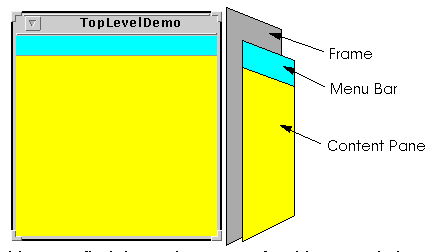 There are three top-level Swing containers:
Each JFrame object implements a single main window, and each JDialog implements a secondary window (a window that's dependent on another window). Each JApplet object implements an applet's display area within a browser window.
NoteSwing also provides intermediate container (JPanel)-- Swing components that, while not top-level containers, exist solely to contain other components. |
  |
