Revive! - So as recover your mistakes ..
Currently, making version 1 of Revive!

  Version 1 changes as follows.

1. Bugfix of version 0.8.
2. Reconsiders all logic.
3. Member Recovery of I/O Error. (See Topic1)
4. Extract to PDS file. ("Extract" says "Extent Recovery" on version 0.8)
-- lines above completed. --
5. pointed at out of address from directory. (See Topic2)
6. Show member. (See Topic3)
7. Recovery of loadmodule.


Test Program : Version 0.0.1 : 98.08.27
Sample Output : Version 0.0.1 Sample Output
It did referring to the following page.
  > GSF Tools & Docs
  > Document : 4.Product codes for all System/360 OS, OS/VS and MVS compilers.

8. Abolishes input of PDS member

Dowload

If You Try "Currentry working virsion REVIVE". download which file. But it's have any error, and incomplete. If you want stability please use "Virsion 0.8".
- 99.10.02 version [ xmi format ]
- 99.10.02 version [ ascii format ]

- 99.07.11 version [ xmi format ]
- 99.07.11 version [ ascii format ]

- 99.02.26 version [ xmi format ]
- 99.02.26 version [ ascii format ]
- Bugs 99.02.26 version

If you downloaded xmi format do accordingly install a following process
1. Binary mode file transfer to "RECFM=F" and "LRECL=80".
2. Use RECEIVE command for file conversion from "sequential file" to "PDS file".
3. Submit "#COMPILE" member
4. Copy panel, message and clist

If you downloaded ascii format do accordingly install a following process
1. EBCDIC mode file transfer to "DSORG=PO" , "RECFM=F" and "LRECL=80".
2. Submit "#COMPILE" member
3. Copy panel, message and clist

Topic 1

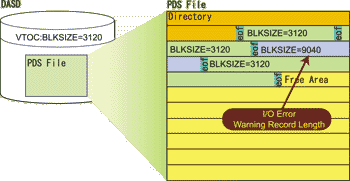
Data set has record format and physical record length on VTOC, but, it can't read data when this value doesn't fit to actual data. Revive analyzes such a data, and write it for the most suitable data set.
This situation occurs when it added a member of a different block size to an existing data set. A beginner can make mistake occasionally, and destruct a data set.

Topic 2

Not only member can't be read but also Compress of the dataset as well becomes error when the address which directory points at doesn't actually exist and when it exceeds the extent that Allocation is being done. Such member doesn't have the dodge except that it is removed. Revive will indicate the error list summary which contains this member.

Topic 3

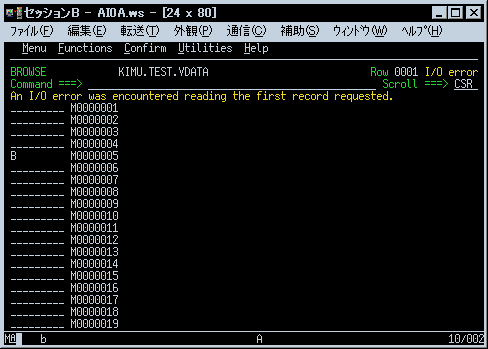
When member was indicated on the screen, temporary entry was made in directory, and then Browse of ISPF was being used with Revive until now. But, when Browse is member (Topic1) in DCB aberration, it becomes I/O error, and it can't be indicated in this technique. As for Browse until now, the unique Browse function of "Show" will be provided separately by the version 1. The manifestation of the member in DCB aberration and restatement by the assignment of RECFM, LRECL are done with "Show".


Back | Home | Tools | Source

1999.02.18-1999.02.26 - Kimu -