|
Frequently Asked Questions
Ryan® HAT
| Q. What are the
minimum System requirements for HATWARE? |
|
| A.
IBM compatible computer, 386 or greater
Windows 3.1, Windows 95 or Windows 98 or NT
4 megabytes of RAM for Windows 3.x
8 megabytes of RAM for Windows 95
16 megabytes of RAM for Windows 98
One available serial port
A VGA monitor (recommended but not required, with 800
x 600 setting)
A mouse is required to use the zoom feature on the graph
|
| Q. Will HATWARE
run on Windows NT Platforms? |
|
| A. Yes. HATWARE has been tested
and will perform on all Windows 95, 98 and NT systems. |
| Q.
What kind of cable is used between the computer and the HAT? |
|
| A. A standard 9-pin serial
cable comes with your HAT package. This cable is sometimes called
a "serial extension cable" or "straight through cable. You may
obtain a replacement cable through Sensitech (800) 843-8367
or at any store that carries computer accessories. |
| Q.
Can I convert the HAT files to a text file format for importing
into Microsoft Excel? |
|
| A. Yes. HATWARE data files
can be exported to a text file (CVS) format for import into
Excel or other database or word processing programs by clicking
on the "Data" label on the HATWARE menu bar. Then select export.
HATWARE will save the file with the original HAT file name appended
with "CSV". All exported files are saved in the C:\HATWARE\EXPROT
directory. |
| Q. Can I replace
the battery in the HAT? How often should I replace it and what
kind of battery should I use? |
|
| A. The HAT uses a single 9V
alkaline battery. It is user replaceable. We recommend you replace
the battery at least every six months. To change the battery,
remove the four screws on the back of the instrument, lift the
back cover, remove the old battery and insert the new one. If
you purchase a battery other than from Sensitech, check to make
sure the battery temperature specifications will work in your
application. |
| Q. Can I replace
the battery without losing data already recorded? |
|
| A. Yes. Your HAT instrument
will retain all data recorded prior to removing the battery,
and will continue to take readings according to the way it was
deployed after replacing the battery. We recommend you check
you battery voltage prior to deploying the HAT, as the unit
is more susceptible to inaccurate readings at lower battery
voltages. (Caution: Sensitech DOES NOT recommend using rechargeable
batteries in this instrument.) |
| Q.
When I try to deploy or recover the HAT, the following error
message appears. What causes this? |
|
|
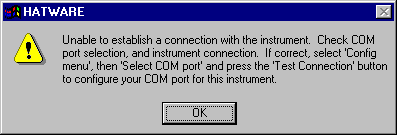
A. Incorrect COM port selection, poor interface cable
connection, bad or broken cables or connectors, inactive or
unavailable COM ports on your computer, software or hardware
COM port conflicts or a dead battery in the HAT instrument
can cause this message to appear. In the event you receive
this message, make sure the HAT is on and the display is active.
In most cases the lack of an active display on the HAT is
a sign of a weak or dead battery. Replace the battery. If
the display remains blank or displays "garbage", the instrument
will have to be returned to Sensitech for repairs. Contact
Technical Services at support@sensitech.com
or call (800) 843-8367 for return procedures.
|
|