
Here it is I finally have it up. The Windows 2000 Computer setup.

Go to Start, Settings, Network and Dial-up Connections.
You will be greeted with this screen:
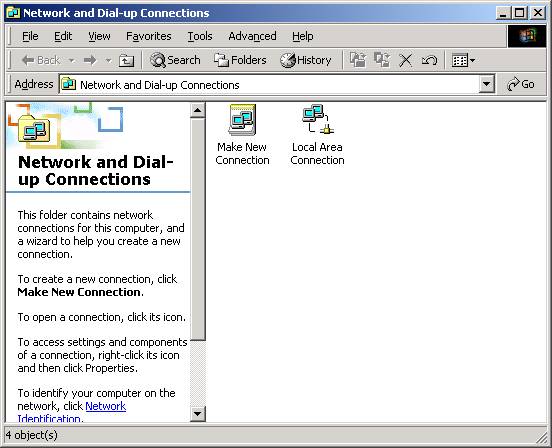
Double click the corresponding Local Area Connection that is connected to the router.

Now click Properties.
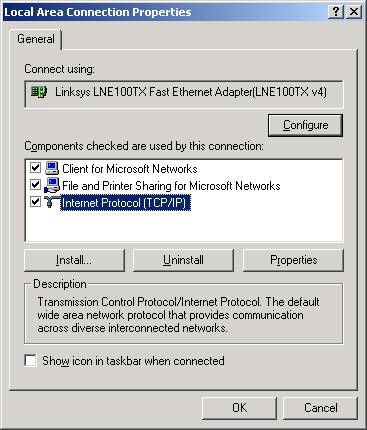
Find Internet Protocol (TCP/IP) (Should be there since it is installed by default) and click properties.
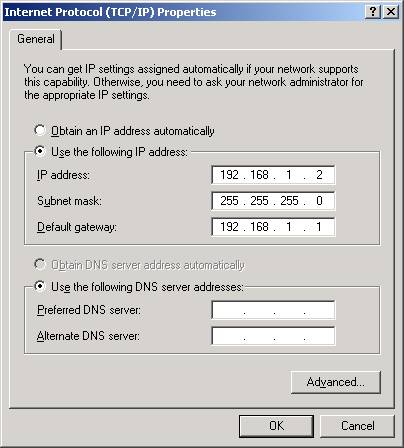
If you want to use a static IP on the PC copy the settings above. If you want to use the router's built in DHCP server, just select Obtain an IP address automatically. I recommend that at least one PC on the LAN use a static IP since it will make configurations easier in the long run.
PPPoE Users
Enter your DNS servers in the boxes marked Preferred DNS server and Alternate DNS server. You only need two but if you have more than one and wish to enter it just click advanced and you will see a tab for DNS. Click that tab and there will be a box to enter more DNS server addresses.
Also some users may experience DNS troubles. If you experience DNS related trouble, the DNS address(es) should be entered above. For the DNS troubleshooter click here.

 Previous
Page
Previous
Page
