
I recommend that you set at least one PC to use a static IP. That is an assigned IP that doesn't change. Make this the main PC that will not leave the network. That makes configuring easier. I only use DHCP for computers that get connected and disconnected such as a laptop that is moved around on different networks.
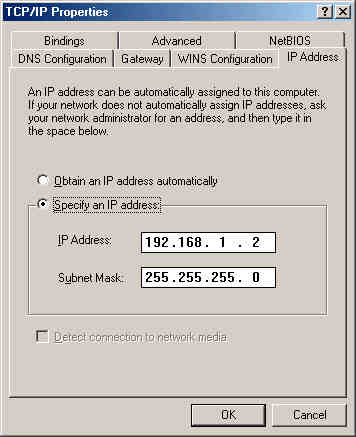
The settings above are the settings I recommend for the main PC that you will be configuring the router from. For other PCs you have the option of either giving it a static IP or letting the DHCP server assign it one.
Static IP
In the IP address field type an IP in the 192.168.1.xxx range with a subnet mask of 255.255.255.0. Remember each device on the network must have a unique IP address.
Dynamic IP (DHCP assigned)
Select the Obtain an IP address automatically option and that's it.

 Previous Page
