I have the original PlayStation.
I have GameShark Version 2.4.Visit GameShark here for latest products http://www.gameshark.com/
With it plugged in to the port on the right back side of your unit,hit the Power button on your PlayStation.
A GameShark is slow to respond.
After pressing a button wait a few seconds for something to happen.
You will see a screen with "GameShark Version 2.4" at the top.
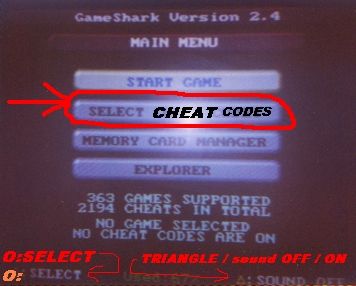
"MAIN MENU" under that.
"START GAME" under that.
"SELECT CHEAT CODES" under that.
"MEMORY CARD MANAGER" under that.
"EXPLORER" under that.
363 GAMES SUPPORTED-(maybe!) under that.
2194 CHEATS IN TOTAL-(maybe!) under that.
NO GAME SELECTED under that.
NO CHEATS CODES ARE ON under that.
In the bottom right you will see "TRIANGLE:SOUND OFF".
For some reason the sound is "ON" if you see "SOUND OFF".
In the bottom left you will see "O:SELECT".
The "O" is CIRCLEon the PlayStation controller.
Use the UP & DOWN arrow keys to choose "SELECT CHEAT CODES" & press CIRCLE
You will see --- New Game --- in a blue box with all games listed in alphabetical order underneath.
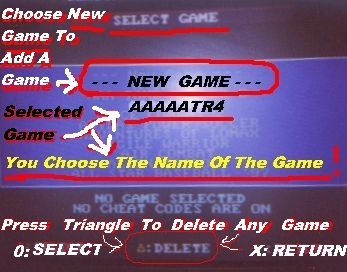
Highlight the game you want by selecting it with the arrow keys.
I added a bunch of "A's" before TR4 to make sure it appeared near the top of the list.
(To delete the highlighted game press TRIANGLE.)
Hit "O".
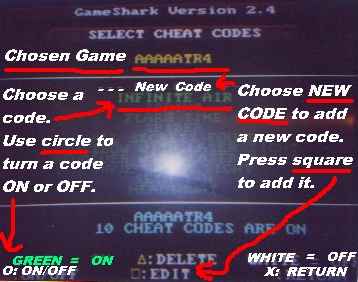
Turn codes on or off or add or delete codes.
To delete a code - Highlight it & press TRIANGLE.
When the RED box opens choose "DELETE" & press CIRCLE.
Hit "X".
Hit "X" again.
Choose "START GAME" & then "START GAME WITH SELECTED CODES".
You will seeX :RETURN in the bottom right.
If you press "O" to get "New Game" a page will appear with "--- New Game ---" in a box under "Please enter new game name".
Press "O" & you will see a blank thin text area with a blinking horizontal cursor( _ ) centered under "Please enter new game name".
You will see a box with the alphabet & various symbols & numbers to the lower right of the textarea with the blinking cursor.
Below this box you will see key instructions for using the text adding box.
The letter "E" will be highlighted in white.

Use the arrow keys to select letters & numbers & symbols.
Hit "O" to add selected things to the thin textarea.
Hit R1 to add a space.
Hit L1 to delete a choice.
Hit TRIANGLE to clear all choices.
The new game name will be in the thin textarea.
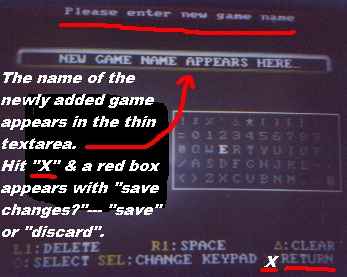
When you have the name typed in hit X.
A screen with a red box will appear prompting "SAVE CHANGES?".
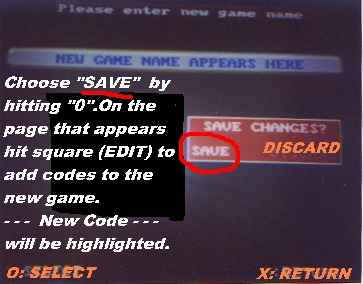
Use the left or right arrow keys to choose "SAVE" or DISCARD".
Hit "O" to choose.
If you "SAVE" changes - a page will appear with the name of the game above a box with --- New Code -- in it.
& the name below the box with the number of cheat codes on.
In the bottom left you will see "GREEN = ON".
With O:ON/OFF below it.
In the middle SQUARE:EDIT
In the bottom right "WHITE = OFF" with X:RETURN below.
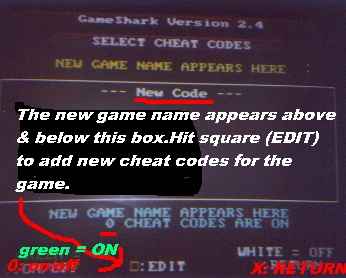
Hit SQUARE
& a page with "New Code Description" will appear with "EDIT CODE" at the top.
With "New Code Description" highlighted hit "O".
The rectangular box with letters & numbers & symbols will appear to the right of the blue box under "DEFAULT ON".
The thin textarea with the blinking horizontal cursor will appear too,above the blue box.
Use the arrow keys as before to choose letters & symbols to name the new cheat code.
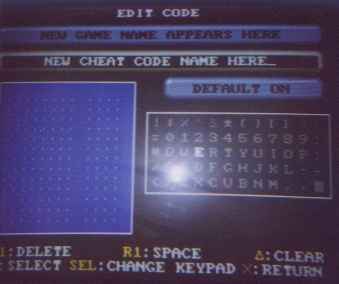
When you have the new cheat code name typed in hit "X" to get rid of the letter text box & highlight the first line of dots in the blue box.
Use the down arrow key to highlight the first line of dots in the blue box.
Hit "O" again to make an 8 plus 11 zeros appear where the dots used to be.
The first 0(zero)- (after the 8) - will be blinking.
Use the arrow keys to select 0-9 or ABCDE or F from the tiny box to the right of the blue box.
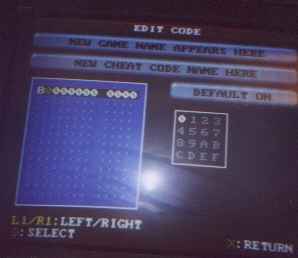
Hit "O" to add the selected letter or number where the cursor is blinking.
Use L1 or R1 to move the blinking cursor left or right in the blue box.
If a code has 2 lines of code put the one starting with 8 first.
Press X.
Press the down arrow key to highlight the line of dots below the first string of code.
Press CIRCLE to get an exact copy of the first line of code where the second line of dots used to be.
Replace this entire string of code with the code that begins with a letter.
Example:800395C6 2400
D00395C4 0022When done hit X.
Hit X AGAIN.
Choose "SAVE" or "DISCARD".
Once you have the new game or codes added highlight the game & hit "O".
Choose to use the codes or turn them off.
You can use only the codes you want to use.
All - some - or none.
Hit "X".
Hit "X" again.
Select "START GAME".
Hit "O".
You can start a game with or without the selected codes.
Hit "O".
The game program starts...
Choose "New Game" or "Load Game".
has GameShark codes for TR4 & many other games.
Cheat Code Central
I hope I got these instructions right.
This is not a complete tutorial.
It should be of some help though.