
Scroll Bar Color Changer
On this lesson you will learn how to use a {Style} that allows you to change the color or color's on the scroll bar of your web pages. This {Style} is very simple and easy to read, I will show you the {Style} and actually show you how it works.
What is Style?
The Style object lets you implement dynamic HTML style sheets in JavaScript. The methods and properties of the Style object implement the cascading style sheet {CSS} style properties of HTML in JavaScript.
An object that specifies the style of HTML elements.
I have added a link to an Extensive list of object controlled by
Style.
What is a {CSS} Cascading Style Sheet?
A Cascading Style Sheet is a separate document that contains a definition list of "styles" for text, images, tables, and other elements.
To simplify the above statements above concerning Style and CSS.
When writing an HTML Document you are actually using HTML/CSS/Style combined. The HTML part is the Document itself if you look in the Style link I provided you will see that you are also using Style object's like: font, font face, font color, align, width, bordercolor, background images, background color.
The Styles tells your{CSS} Cascading Style Sheet and your HTML Document how to look and act. I don't think you know this but when you sign on line and view a web page you just see a web page right?? Let me tell you how things work.
1} An HTML Document is sent to a server.
2} The server reads your entire HTML Document from top to bottom.
3} The server then puts the color, the text, the images, the Hyper links and everything else on your HTML Document in place.
4} Then the server sends all of this information to your Browser so you can view it.
For this lesson, you will need to open your computer's notepad program and your Internet Explorer browser. When writing HTML code, we will always be writing the actual code into notepad and copying and pasting into an HTML editor. Please put all of your work on the class.html page that you created in lesson 1.
The below script MUST be placed between the <HEAD> and the </HEAD> tags.
Please note that the colors in RED below are in what they call a {Hexadecimal Color Code}.
You can find a 216 Hexadecimal Color Chart on the
Mousepad Cloud all you have to do is to change the color in each section of the code to customize your Scroll Bar.
What I have done was to change each individual section of the code and placed it on a seperate page for you to look at. Just click on the section that you want to change to get an idea of what will be changing.
For the best results you should work the Scroll Bar coding just like I have done, one step at a time or one section at a time and then view your changes and make any corrections you deem necessary.
|
<STYLE type="text/css"> <!-- BODY { scrollbar-face-color: "#0A0D82"; scrollbar-highlight-color: "#C0C0C0"; scrollbar-3dlight-color: "#FFFFFF"; scrollbar-darkshadow-color: "#000000"; scrollbar-shadow-color: "#C0C0C0"; scrollbar-arrow-color: "#800000"; scrollbar-track-color: "#800000"; } --> </STYLE> |
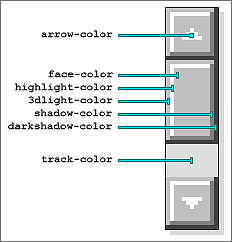
So lets get started.
Please note that I have set these pages up to open up in a New Window. Scroll down the page just a little to find the {Close Window} button..
Click on the
Standard Windows Scroll Bar to see what we will be working with.
This is what the
Arrow color change will look like.
This is what the
Face color change will look like.
This is what the
Highlight color change will look like.
This is what the
3dlight color change will look like.
This is what the
Shadow color change will look like.
This is what the
Dark Shadow color change will look like.
This is what the
Track color change will look like.
If you are finished with the Scroll Bar Color Script
click on the Back link below to go back to the main page of lesson 3.
