Water Effect Turorial
Right
Click on Graphic to and save to your Hardive.


Open Paint Shop Pro using Browse bring in the Graphic you want to use. You will need
to know the dimensions of the Graphic, if its too large resize it. To do this go to
Image>Canvas Size
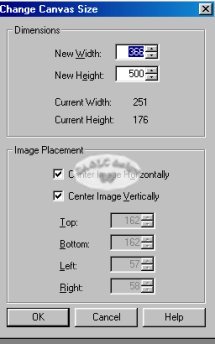
The size of my Graphic is 251 pixels wide and 176 pixels high. Do NOT click on OK..you do
not need to change your Graphics canvas size you only need to see the size of Graphic..
Open a New Transparent Image in in dimensions with the Width being the same as your
Graphic..and the Length being double. Example: mine would be 251 wind and 352 in Length.
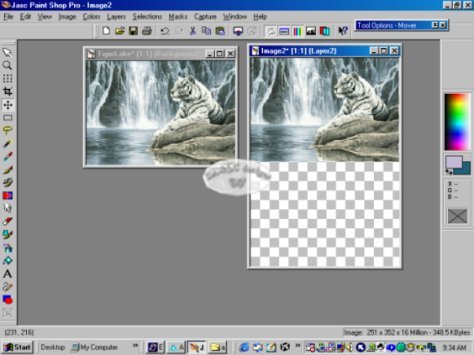
Make
active original Graphic and Edit>Copy, Make active your New Image and
Edit>Paste>New Layer. Drag your new Layer to the top of your new Image.
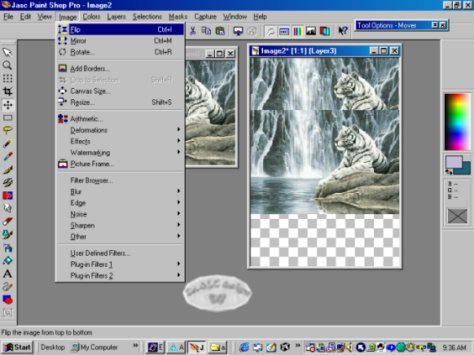
Make active your Original Graphic and again Edit>Copy, Make active your New Image
and Edit>Paste>New Layer. Go up to File>Flip, This will turn your graphic upside
down. Move Layer around until it matches the top Graphic so that it looks like a
reflection.
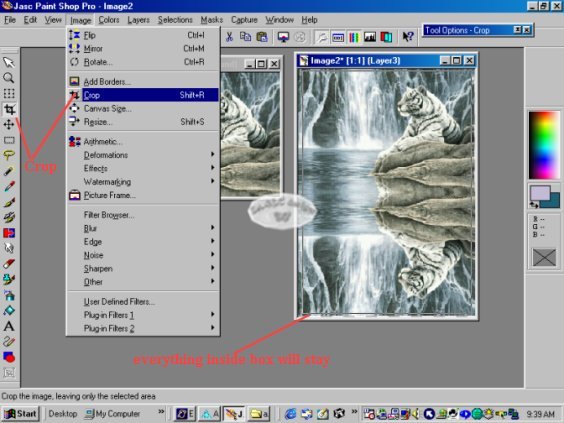
Choose your Crop Tool and crop all Transparent BG showing.
Go to Layers>Merge>Visible
NEXT Page
HOME
All
Tutorials and Graphics on this site ©byDiana/Laura 2000 do not use without permission.
|

