
How do I download documentation and sample documents?
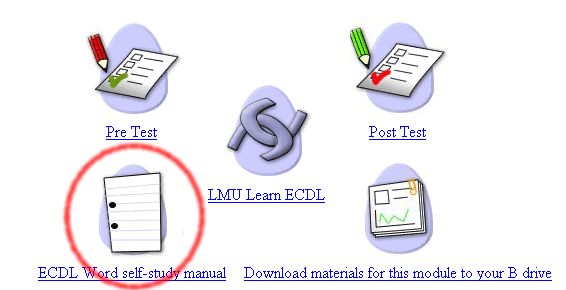
For each module covered in LMU LearnECDL there is a module manual, many users work through lessons and exercises without the manual, but if you would like to download a copy, the link to the manual can be found in WebCT, under the module page, the icon to click is circled in red.
Once you have opened the manual you can save it to your hard drive. If you are in the LMU Learning Centre the drive letter you should save this to is the B drive. The B drive is your 20 Megabytes of network drive space, and is your own personal drive that nobody elses has access to, wherever you log into a PC in the Learning Centre your B drive will follow you. You CANNOT access your B drive from outside of the LMU Learning Centre. To save the manual select the 'File' menu and select the 'Save As...' option as highlighted below.
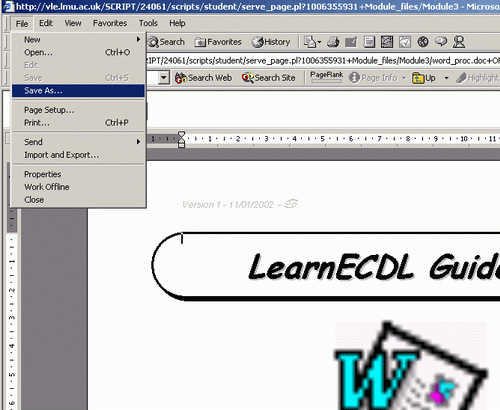
If you are in the Learning Centre save to your B drive, if you are not in the Learning Centre save the document to your local hard drive which is usually your C drive, or save it to your 'My Documents' folder.
If you are outside of the LMU Learning Centre you can also download Module materials including manuals and sample documents from LMU LearnECDL, to do this click on the 'Download the Materials' option from the Module Main page in LMU LearnECDL - as highlighted in red below. The sample documents are the documents that are required to complete exercises whilst taking lessons in LMU LearnECDL.
Unfortunately due to restrictions in effect on Learning Centre PCs, the options within the 'Download the Materials' page will not work within the LMU Learning Centre. Click here for instructions on how to download Sample Documents to your B Drive if you are within the LMU Learning Centre.

If you are outside of the LMU Learning Centre the only way to Download all required module materials is by following the 'Download the Materials' option (above). Once you have clicked this option you should see a page as below.
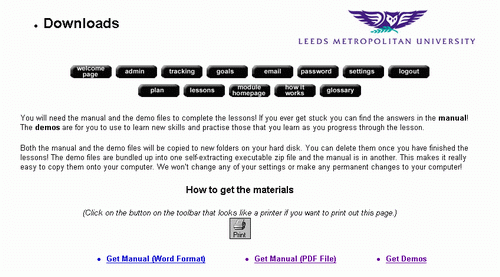
You can download the module manual here in Word or PDF (Adobe Acrobat) format, as well as the Sample documents that you will require for this module. To down load the sample documents click the 'Get Demos' option. Downloads from this page will appear as self-extracting executables, when you click on them it will ask you whether you want to Open the document from its current loacation or save it to disc. Choose the 'save it to disc' option. Full instructions on downloading materials from the LMU LearnECDL Downloads page are given on the page.
I
